Real Estate Website Speed Optimization: Practitioner Guide

The standard guidance on real estate website speed reads the same way the standard guidance on any website speed reads. Compress your images, set up a content delivery network, enable caching, mind your Core Web Vitals. None of it is wrong. None of it is useful enough either, because property sites face a structural performance problem that ecommerce stores and SaaS marketing pages do not. The assets your buyers most want to see, large hero photography, 360-degree tours, drone footage, 3D models of off-plan units, are the exact assets that destroy Largest Contentful Paint and bloat page weight. The job is not to make a slow site fast. The job is to ship a visually rich site that does not feel slow, which is a different problem and requires different decisions.
I run DignuzDesign, a studio that builds custom property sites for developers, agents, and architects across Europe. Most of my work is on Astro deployed at the edge, with the heavy media handled by purpose-built embeds and the 3D pipeline running through Faraday3D. What follows is the framework I actually use when speed is part of the brief, which on property sites it always is, whether the client says so or not.
Why generic web performance advice fails on real estate sites
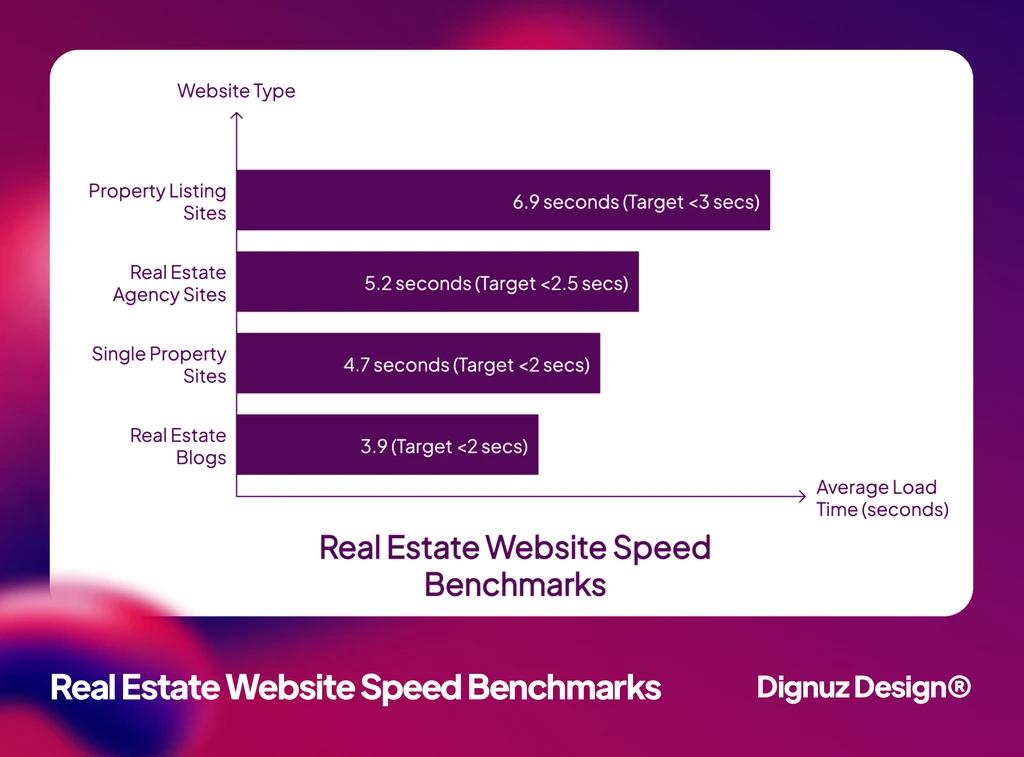
A typical SaaS marketing page is mostly text, with a few hero illustrations and the occasional product screenshot. The total page weight comes in under one megabyte if the team is paying attention. A real estate listing page on the sites I build has between 25 and 40 high-resolution photographs, a virtual tour iframe, a floor plan, and increasingly an interactive 3D viewer for the property itself. Before any code runs, the asset budget is already large.
The HTTP Archive's Web Almanac page weight report tracks the median mobile homepage across all industries at around 2.6 megabytes. A property listing page that takes performance seriously can still come in at several times that figure simply because the product is photographs. So when the standard advice says "reduce image weight," the question on a real estate site is not whether you reduce it, you have to, but how aggressively, on which images, at what visual cost, and using which pipeline. Those decisions are where performance is actually won or lost on a property site, and they do not appear in any generic optimization guide.
This is also why template-based real estate sites struggle to compete on speed. The templates are built to serve every property business, which means they ship every feature, every script, and every layout option that any business might need. The result is a base page weight that already exceeds what a focused custom build would total once finished. The architecture matters, and I have written about this tradeoff in more depth in my notes on why custom real estate websites outperform template solutions.
What slow actually costs in property
The case for speed in property is not the same case as the case for speed in ecommerce, but it is just as direct.
The National Association of Realtors' Profile of Home Buyers and Sellers reports that around 70 percent of buyers use mobile or tablet devices during their home search, and a comparable share start the process online. That is your first audience, and you reach them on devices that are usually less powerful than the laptop where the site was built and on connections that are slower than your studio Wi-Fi. The asymmetry between how the site feels to the people who made it and how it feels to the buyer is the entire performance problem.
The Deloitte study Milliseconds Make Millions measured 30 million user sessions across 37 European and American brands and found that a 0.1 second improvement in mobile site speed produced an 8.3 percent reduction in bounce rate for lead generation sites, the closest category to a property business. That is not a vanity metric. On a developer's pre-launch microsite or an agency portal, bounce rate is the difference between a buyer who books a viewing and one who closes the tab. Multiply that by your monthly traffic and the math gets blunt.
The reason this study is the one worth citing rather than the generic "53 percent abandon after 3 seconds" statistic that circulates on every speed article is that it isolates speed itself, controls for traffic source, and is large enough to produce stable effect sizes. Most speed statistics are extrapolated from much smaller samples and recirculated until they look universal.
The image strategy that actually moves the needle
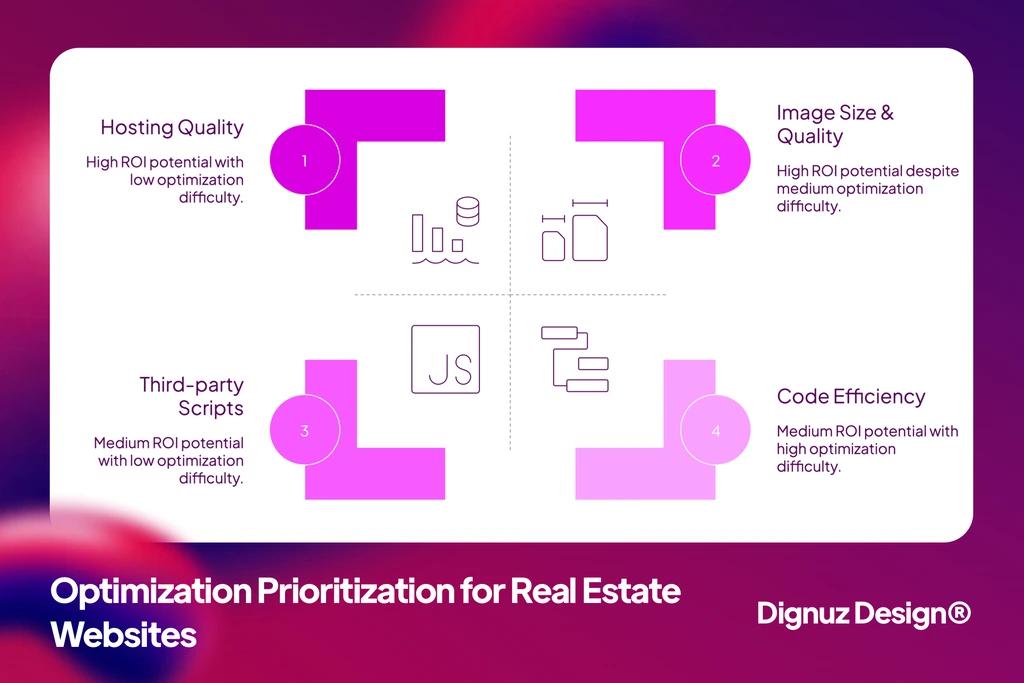
Image optimization is the single highest-leverage performance work on a property site, and it has three layers that need to be addressed in order. Get the order wrong and the work compounds incorrectly. Get the order right and you recover seconds rather than fractions.
The first layer is sizing. Most property sites I audit serve a 4000-pixel-wide image scaled down by the browser to a 600-pixel display slot. The buyer downloads forty times the data needed and then the browser spends the decode time to resample it. Use responsive image syntax with srcset and sizes correctly and the browser fetches the version that matches the viewport. This single change typically cuts image payload by 60 to 80 percent without any visible quality difference, before you have touched the format or the loading strategy.
The second layer is format. AVIF is the strongest option for property photography because it preserves detail in the textured surfaces, marble, fabric, wood grain, that matter aesthetically in real estate. WebP is the universal fallback. The original JPEG should remain as a third tier only for very old browsers. Serve all three from a single <picture> element and let the browser pick. The aggregate gain over a JPEG-only pipeline across a full gallery is typically 35 to 60 percent.
The third layer is loading priority. The hero image on a listing page needs fetchpriority="high" and should not be lazy-loaded, because it is the Largest Contentful Paint candidate. Everything else, every gallery image below the fold, every floor plan, every secondary photograph, needs loading="lazy". The mistake I see constantly is teams either lazy-loading the hero, which destroys LCP, or eager-loading everything, which inflates the initial transfer and competes for bandwidth with critical resources. The right answer is one priority image at the top, lazy everything else.
This is the one place a comparative summary is more useful than prose, so it is the only bullet list in this article.
- AVIF delivers the smallest file size for photography and is now supported in the vast majority of browsers in active use, which makes it the right primary format for hero images and large galleries on property sites.
- WebP is the universal fallback that should still be generated for older browsers and email clients, and offers a meaningful 25 to 35 percent reduction over JPEG with no visible quality loss in property photography.
- JPEG remains the safety net for the few percent of traffic that cannot handle either of the modern formats, and should be progressive-encoded so the image renders incrementally rather than blocking on the full byte stream.
- PNG is reserved exclusively for logos, icons, and graphics with transparency, never for property photography, because at typical gallery resolutions PNG files are several times the size of an equivalent AVIF for no perceptible benefit.
After image sizing, format, and priority are correct, you will recover more performance than any other intervention combined. Hosting upgrades, CDN changes, and code minification combined typically move LCP by hundreds of milliseconds. A correctly executed image pipeline moves it by full seconds.
The video and 3D problem nobody writes about
Property marketing has shifted toward richer media. Drone footage is now a baseline expectation on luxury developments. Virtual tours are expected on most mid-tier listings. Interactive 3D viewers for off-plan and new developments are increasingly standard. These assets carry serious performance weight and the standard performance literature does not address them, because it was written for sites where the heaviest asset is a product photograph.
For autoplay hero videos, the answer is restraint and discipline. The video must be muted, must be set to play inline, must have a poster image that loads first so the buyer sees something coherent before the video stream initializes, and must be under five megabytes for the segment that plays in the first viewport. Encode in H.264 for compatibility and ship a second pass in AV1 for browsers that support it. Anything longer than the hero loop belongs further down the page, lazy-initialized only when the buyer scrolls into view.
Virtual tour embeds, Matterport, Kuula, Pannellum, and the like, should be deferred until the user reaches them. The mistake I see most often is the tour iframe loaded on initial page render, which immediately triggers the third-party vendor's JavaScript, costing the page two hundred to four hundred milliseconds of script execution time before the user has even scrolled. Use an intersection observer to mount the iframe only when it is close to the viewport, and place a static preview image in the slot until then.
The 3D viewer problem is the one I have spent the most time on. Off-plan developments now routinely ship with an interactive 3D model so buyers can explore units before construction completes. Most third-party players were not designed for the web performance constraints of a property listing page. The WebGL bundle is too large, the asset loading is not progressive, and the page's LCP and INP scores collapse when the viewer mounts. This is the gap I built AmplyViewer to close. The bundle ships only when the user requests it, the 3D assets stream progressively, and the viewer occupies a placeholder slot until activation so layout shift does not destroy the page's CLS score. Whether you use my tool or another, the criteria are the same: lazy initialization, progressive asset loading, and a fixed-aspect placeholder.
Hosting, edge delivery, and the CDN question
Most real estate sites I audit are still hosted on a single-origin server, often a WordPress install on a shared hosting plan. The latency from a buyer in Madrid hitting an origin in London is fine. The latency from a buyer in Dubai hitting that same London origin is not. Buyers come from everywhere, and a property in Marbella is being searched for by people in Stockholm, Riyadh, and São Paulo. Single-origin hosting is the wrong default in this category.
The fix is edge delivery. A modern CDN, Cloudflare, Fastly, Bunny, caches the HTML, the images, the CSS, and the JavaScript at hundreds of points of presence around the world, so the buyer in Dubai gets the same time-to-first-byte as the buyer in Madrid. The cost is usually trivial, the setup is usually one weekend of work, and the gain is large enough that you will see it on the Search Console Core Web Vitals report within a month. This is also why I default to building property sites on a Jamstack architecture with Astro at the edge, which I cover in more depth in my notes on Jamstack property developer websites.
Caching deserves a specific note because real estate sites have a caching paradox. The listing inventory changes constantly as properties sell, get added, or update their price. Aggressive caching that does not invalidate properly will serve stale property data to buyers, which is worse than serving slightly slower fresh data. The right approach is to cache the static shell, the templates, the design system, the navigation, aggressively, and to revalidate the listing data on a short window. The implementation depends on the stack, but the principle is the same: do not cache things that need to be fresh, and do cache everything else.
Core Web Vitals targets that matter for property sites
Google publishes generic thresholds for the three Core Web Vitals: LCP under 2.5 seconds, INP under 200 milliseconds, CLS under 0.1. These are minimum bars, not targets, and on a property site you should aim significantly tighter, because your buyers are on the slow end of the network spectrum more often than the average web user.
LCP is dominated by the hero image. If you have done the image work above, LCP should be under 1.8 seconds on a 4G connection without any further tuning. If it is not, the suspect is almost always a render-blocking script or stylesheet in the head that should be deferred. The web.dev case studies on Core Web Vitals business impact document real conversion lifts of eight to fifteen percent from LCP improvements of around 30 percent, and the same pattern shows up on the property sites I have rebuilt. The lift is not theoretical and it is not industry-specific.
INP, the responsiveness metric that replaced FID, matters more than people realize on property sites, because property search is interaction-heavy. Every filter click, every map pan, every price slider drag is an INP measurement. If your search filter logic blocks the main thread for 400 milliseconds while it re-renders the listing grid, the buyer feels the lag and Google records the failed metric. The fix is usually to debounce the filter handler, virtualize the listing grid so only visible cards render, and move any non-trivial computation off the main thread. The detail on how filters and search interact with the rest of the listing experience is covered in my notes on property listing design best practices.
CLS is the easiest of the three to control on property sites if you reserve space for every image and every embed. The common offenders are virtual tour iframes without a fixed aspect ratio, gallery thumbnails that pop in late, and ad slots that push content down when they finally load. Reserve the space, set the aspect ratio, and CLS stays low without further attention. If you are layering virtual tours, drone reels, and 3D viewers on the same listing page, this discipline is the difference between a usable page and one that visibly jumps as each asset arrives.
What to measure, and what to stop measuring
Most teams I work with measure speed with the wrong tool at the wrong moment. PageSpeed Insights runs a synthetic test from a specific location with a specific network profile. It is useful, but it is not what your buyers experience. The metric that matters is field data from real users, which Google calls the Chrome User Experience Report. Search Console surfaces this directly under the Core Web Vitals report. That is the number to track over time, not the synthetic PageSpeed score that fluctuates run to run for reasons that have nothing to do with your site.
Lab tools like Lighthouse, WebPageTest, and the DevTools Performance panel are diagnostic, not evaluative. Use them to find specific bottlenecks when field data shows a problem. Do not use them as the metric of record. A site that scores 92 in Lighthouse can still have a poor field LCP at the 75th percentile if real buyers are on slower devices than the synthetic test profile assumes, which on property sites they very often are.
Set up alerting on the field metrics through Search Console or a third-party real user monitoring tool. The pattern that catches teams out is the slow drift, where a series of small additions over six months, a new chat widget, an extra analytics script, an embedded social feed, gradually pushes the field LCP from 1.9 seconds to 2.7 seconds. The change is never visible in any single deployment. It is only visible in the trend line. Alerts on the trend line save you from that drift.
Once measurement is in place, the link to broader user experience becomes obvious. Speed is the first signal of quality on a property site, and the discussion of how the rest of the experience compounds on top of it sits in my notes on real estate website user experience. The fast site is the precondition. Everything else, navigation, search clarity, lead capture, builds on it.

💻 Let us help you create a stunning online showcase for your projects that works seamlessly across all devices. Ready to amplify your real estate business? 👉 Explore AmplyViewer now
Frequently asked questions
What load time should a real estate website target on mobile?
Under two seconds for time-to-interactive on a 4G connection, under 1.8 seconds for LCP at the 75th percentile of real user sessions, and under 200 milliseconds for INP. The generic "under 3 seconds" benchmark is the floor that gets you out of Google's poor-performance bucket, not the target. Property sites that compete for high-intent search terms need to be in the top decile of speed for their category, not just acceptable. If you are aiming at the floor, you are not aiming.
Why is my real estate website so slow even after image optimization?
In most audits I have done, the second culprit after images is third-party scripts. Chat widgets, analytics suites, heatmap tools, social media embeds, and CRM tracking pixels each add 50 to 200 milliseconds of script execution time and often more during initial load. Audit your script tags, remove anything that does not earn its keep, and defer or async-load the rest. The single biggest unexpected win in most performance audits is the script you forgot was installed three years ago and never removed.
Do I need a CDN for a small real estate website with one or two agents?
Yes. The cost of a CDN like Cloudflare is zero for the typical small business use case, the setup is a single afternoon, and the benefit is meaningful for any visitor more than a few hundred kilometers from your origin. A two-agent boutique with high-value listings reaches international buyers more often than a national chain reaches local-only buyers, so the latency improvements compound on exactly the high-margin traffic you want.
Will switching from WordPress to a static site speed up my real estate site?
In almost every case, yes, and significantly. A WordPress site renders the page server-side for each request, runs database queries for the listing data, and applies a stack of plugins on every load. A static site, generated at build time and served from the edge, skips all of that work on the request path. The tradeoff is that your CMS workflow changes, which matters for content teams used to the WordPress admin. On property sites where the listing data is structured and feeds in from a portal or an MLS, the static approach is usually a clear win. I cover the broader architecture decision in web design for real estate companies.
How do virtual tours and 3D viewers affect Core Web Vitals?
Catastrophically if loaded on initial render, negligibly if deferred. The pattern I use is to render a static placeholder image at the correct aspect ratio in the slot the tour or viewer will occupy, then mount the actual embed only when the user scrolls within one viewport of the slot. This preserves LCP and CLS, and the buyer never notices the deferral because the embed activates by the time their scroll reaches it. Done right, an interactive 3D viewer can be on every listing page without any measurable cost to field performance.
Does Google still penalize slow real estate websites in search rankings?
Speed has been a ranking signal for over a decade and Core Web Vitals became part of the page experience signal during the page experience update rollout. The penalty is real but rarely catastrophic on its own. What is catastrophic is the compounding effect of slow speed plus poor mobile usability plus thin content. Speed is the precondition that allows the other ranking signals to do their work. On its own it does not make you rank. In its absence it caps how high you can rank.
Closing thought
The performance problem on a property website is not the performance problem on a generic website. It is a tradeoff between visual richness and load time, and that tradeoff has to be made consciously, asset by asset, by someone who understands both sides of it. The standard playbook of "compress images and add a CDN" gets you a third of the way. The remaining two thirds come from understanding which assets the buyer actually engages with, which can be deferred, which can be downscaled without losing the marketing impact, and which are simply not worth their weight. That work cannot be templated, and that is why generic speed advice consistently fails property sites.
If you are running a property business and your site is slow in the field even though it scores well on synthetic tests, the answer is almost always in the asset pipeline rather than in the framework or the host. I build custom property sites at DignuzDesign, the 3D and visualization work runs through Faraday3D, and the interactive 3D embeds for off-plan developments come from AmplyViewer. The principles in this guide are the ones I apply on every property site I ship.



