Real Estate Website Launch Checklist: Practitioner Guide

The Checklist - Up Front
✅ Website Launch Checklist
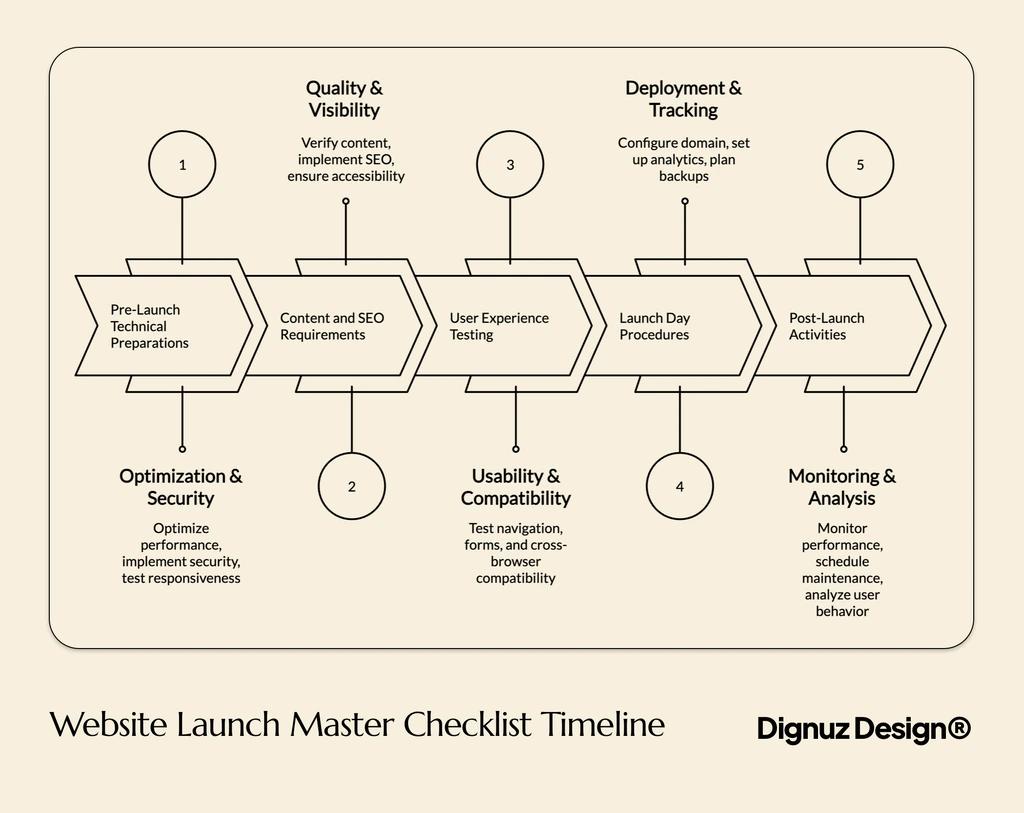
🔧 Pre-Launch Technical Preparations
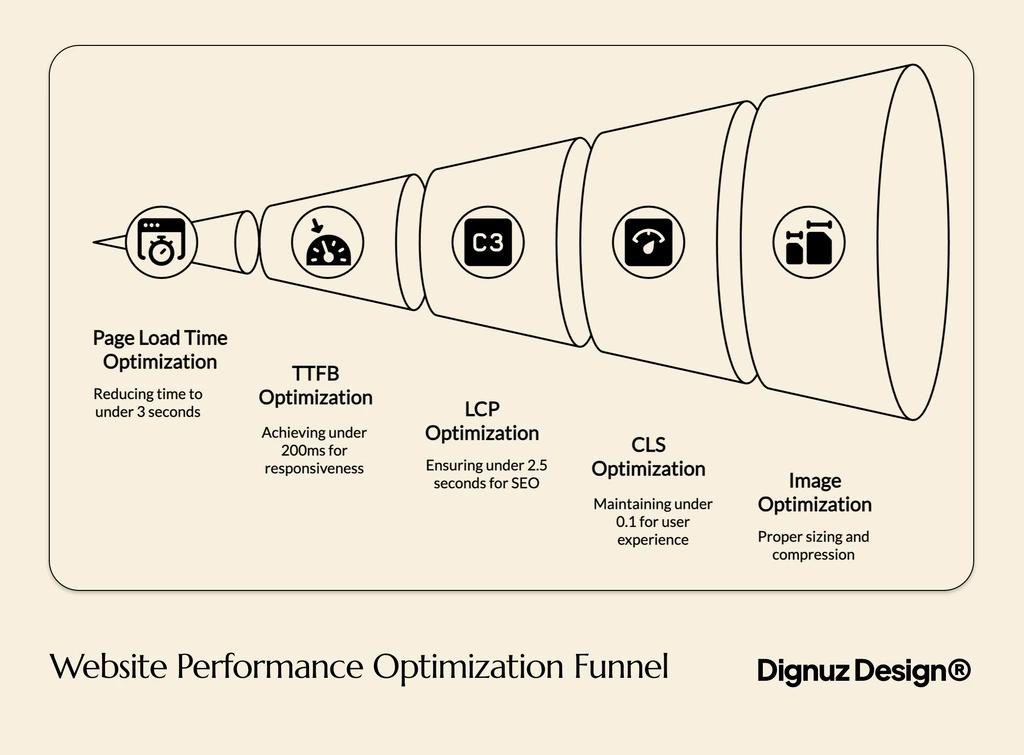
Performance Optimization:
☐ Page load time under 3 seconds
☐ Time to First Byte (TTFB) under 200ms
☐ Largest Contentful Paint under 2.5 seconds
☐ Cumulative Layout Shift under 0.1
☐ Optimize all property images
☐ Use Google PageSpeed Insights for performance evaluation
Security Implementation:
☐ Purchase and install SSL certificate
☐ Update all links to HTTPS
☐ Install and run malware scanner
☐ Set strong password policies + account lockout features
☐ Add CAPTCHA and honeypot fields to forms
☐ Test for form data sanitization
☐ Conduct regular monthly malware scans
Mobile Responsiveness Testing:
☐ Test on various devices (iOS, Android, tablets)
☐ Test in portrait and landscape orientations
☐ Verify button and link tap spacing
☐ Confirm font readability on small screens
☐ Ensure images resize properly on all screen sizes
☐ Test mobile usability of property listings
✍️ Content and SEO Launch Requirements
Content Quality Verification:
☐ Proofread all text for grammar and spelling
☐ Remove placeholder text (e.g., lorem ipsum)
☐ Review images and media for quality and alt tags
☐ Test all downloadable files for working links
☐ Verify all contact info (phone, email, address)
☐ Double-check property descriptions for accuracy
SEO Elements Implementation:
☐ Add meta titles and descriptions for each page
☐ Implement structured data/schema markup
☐ Optimize keywords in content and headings
☐ Submit sitemap to Google Search Console
☐ Verify robots.txt settings
☐ Use property-specific schema for listings
Accessibility Compliance:
☐ Add text alternatives (alt text) for all images
☐ Ensure keyboard navigation works throughout the site
☐ Meet WCAG 2.1 compliance standards
☐ Check color contrast ratios
☐ Test screen reader compatibility
🧪 User Experience and Functionality Checks
Navigation and User Flow Testing:
☐ Verify menu structure is logical and complete
☐ Test all internal and external links
☐ Create and evaluate user journey maps
☐ Confirm intuitive navigation paths to property listings
Form and Interactive Element Testing:
☐ Test forms with valid and invalid inputs
☐ Confirm submission success and error handling
☐ Verify required field validation
☐ Ensure accessibility with keyboard and screen reader
☐ Test sliders, maps, calculators across browsers
Cross-Browser Compatibility:
☐ Test latest versions of Chrome, Firefox, Safari, Edge
☐ Verify layout and functionality on each browser
☐ Confirm virtual tours and galleries work across platforms
🚀 Launch Day Procedures
Domain and DNS Setup:
☐ Verify DNS and domain are correctly configured
☐ Maintain old hosting during DNS propagation
☐ Document all DNS changes
Analytics and Tracking Setup:
☐ Install Google Analytics tracking code
☐ Verify tracking in real-time
☐ Set up Google Search Console and submit sitemap
☐ Implement conversion tracking for key events
☐ Set up heatmaps or user behavior tools (optional)
Backup and Rollback Plan:
☐ Backup new site before going live
☐ Backup existing (old) site
☐ Prepare a rollback plan and assign responsibilities
☐ Document credentials and access info for providers
📈 Post-Launch Monitoring and Optimization
Performance Monitoring:
☐ Monitor uptime, errors, and load speeds in first 24 hours
☐ Review traffic, conversions, bounce rate in first week
☐ Track engagement and search visibility in first month
☐ Implement ongoing performance and UX improvements
Security & Maintenance:
☐ Weekly: update plugins and core software
☐ Monthly: run security scans
☐ Quarterly: review performance optimization
☐ Bi-Annually: audit and refresh content
☐ Verify property listings and image galleries remain current
Conversion & User Behavior Analysis:
☐ Track property views and inquiry form completions
☐ Conduct A/B testing on CTAs and listings
☐ Analyze user paths to optimize listing engagement
☐ Use data to adjust content and improve lead gen
🏠 Real Estate-Specific Elements
☐ Test property search filters and parameters
☐ Verify virtual tour and 3D model compatibility
☐ Confirm neighborhood info accuracy
☐ Review agent bios and credentials for completeness
☐ Test CRM integration with inquiry forms
⚠️ Common Mistakes to Avoid
☐ Don’t skip cross-device/browser testing
☐ Don’t ignore mobile usability
☐ Don’t launch with slow page load speeds
☐ Don’t forget to proof content for errors
☐ Don’t neglect basic SEO implementation
☐ Don’t use low-quality or placeholder property images
OK, now you’ve got the cheat sheet, here’s why it all pays to check and plan…
A website launch is mostly invisible work. The client sees DNS flip and the new homepage appear. What they do not see is the four weeks of integration testing, asset audits, schema validation, and rollback rehearsals that decide whether the site survives its first real traffic spike. I run DignuzDesign, a studio that builds custom property websites for developers, agents, and architects, and the failure modes are remarkably consistent across every launch.
The same things break. Image galleries that worked in staging but stall in production because the CDN headers are different. Virtual tour iframes that mysteriously stop loading on iOS Safari at 8pm on launch day. CRM webhooks that pass test payloads in staging but silently drop real inquiries because the production webhook secret was never rotated. Listing schema that validates on Google's tester but does not trigger a rich result because the photo URLs return 403. None of these are on the generic "website launch checklist" articles you will find ranking for this query. They are what actually decides whether your launch is a success.
This is the checklist I run for every property site I push live. It is biased toward real estate, which means image-heavy galleries, third-party listing feeds, CRM integrations, multilingual property pages, and embeds for virtual tours and 3D viewers. The underlying logic applies to any production launch, but the specifics matter, and the specifics are where generic checklists fall apart.
Reframe the launch
Most launch checklists treat launch day as the centerpiece. It is not. Launch day, if you have done the prep right, is anticlimactic. The DNS flips, the analytics pings start firing, the first organic visitor lands within an hour, and nothing dramatic happens. The real work is in the two weeks before launch and the two weeks after.
The thing that goes wrong on launch day is almost never the thing on the checklist. It is the integration nobody owned. The DNS record that points to the wrong origin because the registrar UI showed a cached value. The Cloudflare page rule that conflicts with the redirect map. The XML sitemap that was generated against staging URLs and then submitted to Google Search Console. These are the launches where everything looked green and then someone refreshes the property page and sees the staging logo, or worse, sees the placeholder agent bio that nobody had touched in six weeks because everyone assumed somebody else had.
So I treat the launch as a system test. The question is not "is the site ready," it is "what happens when this site receives real traffic with real users from real referrers, on real devices, in the actual production environment." That is a different question, and it produces a different checklist.
What to freeze and what to test in the two weeks before launch
The first hard rule is to freeze the content two weeks out. Not the design, the content. Property descriptions, agent bios, neighborhood data, legal copy, the about page. If your client is still editing copy 48 hours before launch, the launch is at risk, because every late edit invalidates your QA pass and re-opens questions you had already closed. I tell clients this on the kickoff call and write it into the workflow on the workflow page, because skipping it almost always causes pain.
The work that genuinely runs in parallel in that two-week window is the only thing in this guide that justifies a bullet list. Everything else is sequential and reads better as prose.
- Production-staging parity. Production should be a byte-equivalent clone of staging by the start of week one. Same theme version, same plugin versions, same image CDN origin. If a single integration is staging-only, typical culprits are payment processors, CRM webhooks, and analytics IDs, then document it in a single file and walk that file at the launch dress rehearsal so nothing gets missed.
- Asset audit on hero images and property galleries. Every property listing image should be checked for resolution, aspect ratio, alt text, and rights. On one launch I caught a developer client about to publish 40 listings using renders from a 3D studio that had revoked the license. We replaced the assets with a fresh batch from Faraday3D the day before launch, which is precisely the kind of last-minute scramble a proper asset audit two weeks out prevents.
- Third-party feed validation. If the site pulls from an MLS feed, IDX, Idealista, RETS, or any portal API, run a full sync in staging at production load. Feeds that work for ten listings often break at four hundred because of pagination, rate limits, or character encoding on accented place names that nobody tested.
- Schema and structured data. Real estate listings need RealEstateListing or Product schema with valid offers, photos, and address. Validate every property template type, not just the homepage. A common failure mode is a single property type, often land plots or commercial units, that uses a different template and fails schema validation across the entire category without anyone noticing until indexing collapses.
- Redirect map. Every old URL needs an explicit 301 redirect to its new equivalent. Not a wildcard, explicit. Wildcard redirects strip query strings and lose the filter state your buyers had in bookmarked old search URLs, which is exactly the traffic you cannot afford to lose.
That is the only bullet list in this article. The rest of the work is sequential and the prose is where the real practitioner detail lives.
Performance is a real-estate-specific problem
Generic launch checklists tell you to "optimize images." On a property website that advice is meaningless. The whole site is images. A typical listing page on the sites I build has 25 to 40 high-resolution photographs, a virtual tour iframe, a floor plan SVG, and sometimes an interactive 3D model. Optimizing this is a different category of work from optimizing a SaaS marketing page, and most launch guides do not even acknowledge the difference.
What actually matters is Largest Contentful Paint on the listing template, because that is the page users land on from organic search. Get the hero image priority-hinted, served as AVIF with WebP fallback, sized correctly per breakpoint, and lazy-load everything below the fold. INP, the responsiveness metric that replaced FID, matters more than people realize on filter-heavy property search pages, because every filter click is an interaction that must complete in under 200 milliseconds for Google to score it as good. Google's Core Web Vitals documentation is the source of truth here, not the third-hand statistics that fill most launch checklists.
The trap is testing performance on the homepage. Homepages are usually fast. The listing pages, search results, and gallery views are where the budget gets eaten. Test those. If your developer can only deliver one performance budget, make sure it is on the listing template, not the homepage. For sites I build on Astro deployed to Cloudflare, I aim for LCP under 1.8 seconds and INP under 150ms on listing pages, not the 2.5s and 200ms thresholds Google uses for "good." The gap is the buffer for slow mobile networks in countries where my clients sell, and many of those buyers are on connections where 3G is still common. There is more detail on this in my notes on real estate website speed optimization, which goes into the asset pipeline in more depth.
The 24 hours before launch
DNS TTL down to 300 seconds 48 hours before launch. This single change is the difference between a fast rollback and a 24-hour disaster. If you do not lower the TTL, your propagation window for any fix is whatever the previous TTL was, often 86400 seconds, which means a botched launch can take a full day to revert. Doing this two days early is free and removes one of the largest risks on the table.
Run a full backup of both the old site and the new site. Database, files, configuration, environment variables. Store both somewhere that is not the same host. I keep launch backups in object storage with a 90-day retention, and they have saved more than one client from CMS issues that emerged in week two when memory of the launch state was already fading.
Document credentials in one place that more than one person can access. Domain registrar, DNS provider, CDN, CMS admin, CRM admin, analytics, Search Console, photographer asset library, virtual tour vendor admin. If the only person with the registrar login goes on holiday the week after launch, recovery time on a DNS issue triples. This is the kind of mundane operational detail that nobody talks about, but it is the difference between a launch you can defend and one you cannot.
Walk the rollback plan. Not write it, walk it. Pretend the launch failed at the moment DNS flips and you need to restore the old site within 30 minutes. Who runs the DNS revert? Who restores the old CMS database? Who tells the client? If those answers are not crisp, your rollback is not real. I have rolled back exactly one launch in the last few years, and the reason it took 18 minutes rather than three hours is that we had walked the plan two days earlier.
Launch hour and the first week
When DNS flips, the first thing to verify is that traffic is actually hitting the new origin. Tail the access logs. If you are on Cloudflare, watch the analytics dashboard for the spike on the new hostname. If you do not see traffic on the new origin within ten minutes, something is wrong with the DNS or the CDN routing and you should investigate immediately rather than waiting it out.
Check Search Console within an hour. Submit the new sitemap manually. Use the URL Inspection tool on three or four critical pages, the homepage, the most-trafficked property listing, the contact page, and the main property search results page. If any return a soft 404 or a fetch error, fix it before crawl budget is wasted on broken paths. The same logic applies to any feed you serve to portals: validate the feed externally on launch day, do not assume it works because it worked yesterday in staging.
Verify CRM webhooks by submitting a real test inquiry on every form. Property inquiry forms, contact forms, valuation requests, viewing bookings, newsletter signups. Each one needs to land in the CRM with the right tags, the right routing, and the right reply-to address. The single most common post-launch failure I see is a CRM webhook that worked in staging but is wired to the wrong list in production, and inquiries fall into a black hole for 72 hours before anyone notices that the agents have nothing to follow up on.
In the first week, watch for the patterns that staging cannot reveal. Real users do things QA does not. They paste tracking URLs from old email campaigns, they bookmark filter URLs with three layered facets, they search for properties in Cyrillic or Mandarin or with apostrophes in the name, they hit the site from inside corporate proxies that strip referer headers. The first week of real traffic is the real test of whether the site is genuinely production-ready.
The National Association of Realtors' Profile of Home Buyers and Sellers reports that between 43 and 47 percent of recent buyers start their home search online. The website you have just launched is the first surface those buyers touch. If the property search does not work for them in their first three minutes, you have lost them, and you will not know, because they do not fill out a form to tell you they left.

The real estate-specific gotchas
These are the items I have almost never seen on a generic launch checklist, and they are the items that break property launches.
Virtual tour and 3D embed lifecycle
Matterport, Kuula, AmplyViewer, Pannellum, whatever the embed, they load slowly and they fail silently when a Content Security Policy header blocks the iframe. Set the iframe to lazy-load, but verify it loads on slow connections within a reasonable window. Add a placeholder image that matches the tour aspect ratio so layout shift does not tank your CLS score on the listing template. If you are embedding interactive 3D viewers, my own AmplyViewer is the one I build for off-plan and development projects precisely because most third-party players were not designed for the property use case. The embed needs to lazy-init below the fold and load the heavy WebGL bundle only when the user scrolls into view, otherwise it strangles the rest of the page's performance.
Listing schema with photo permissions
RealEstateListing schema requires photo URLs, and those URLs need to be publicly fetchable by Googlebot. That is not always the case if your image CDN signs URLs or restricts hot-linking. Test by fetching the schema photo URLs from an external network without authentication. A schema that validates but points to 403-protected images will never produce a rich result, and you will not know until you check months later why your listings are not showing photos in search.
Multilingual property pages
Most of my clients sell internationally. That means hreflang tags on every property page, in pairs, with a self-referencing tag for each language. Forgetting hreflang does not break anything visible. It just means Google does not surface the right language to the right buyer, and you find out three months later when the Spanish version of a Marbella listing is outranking the English one in Mayfair searches. Spot-check ten properties per language pair before launch, and validate that the canonical points at the language version, not at the default.
Photographer rights and metadata
When CMSs import images they often strip EXIF and IPTC metadata, which is where photographer credits and rights live. If your client has a contractual obligation to credit the photographer, verify the credit appears in the visible caption or alt text, not just in metadata the CMS deleted. This has caused two separate legal letters in launches I have been adjacent to, and both could have been avoided with a five-minute pre-launch check.
Floor plan and PDF accessibility
Floor plans uploaded as JPGs or unsearchable PDFs fail accessibility checks. The W3C Web Content Accessibility Guidelines at AA conformance is what most legal frameworks now reference, and ADA Title II cases in the US increasingly cite WCAG 2.1 AA as the benchmark for compliance. Alt text on floor plans should describe the layout in plain language ("two-bedroom apartment with open-plan living and kitchen, south-facing balcony, 78 square metres"), not say "floor plan." The accessibility win and the SEO win are the same win, because Googlebot reads alt text and floor plan descriptions and weights them in the listing's relevance.
What people obsess about that does not matter, and what they ignore that does
A few opinions, formed from launches that have gone sideways and launches that have not.
Page speed scores on third-party tools matter less than real-user-monitoring data. A site that scores 78 on PageSpeed Insights but loads in 1.4 seconds for actual buyers on actual devices is fine. A site that scores 95 but hangs for four seconds on the listing carousel because of a third-party tracker is broken. Install real-user monitoring before launch, not after, so you have a baseline to measure against rather than vibes.
SSL configuration is a solved problem. Stop spending time on cipher suites. Use a reputable hosting provider or Cloudflare, enable automatic certificate management, and move on to something that actually moves the needle.
Cookie banner compliance is not solved, especially for European audiences. If your client sells property in the EU, the cookie banner is a real legal exposure and a real conversion problem. The wrong banner kills analytics tracking and tanks lead quality because users dismiss it without consenting and your marketing team is then optimizing against partial data. Spend the pre-launch time here, not on cipher suites.
Mobile testing should be done on actual devices. Browser emulation lies. The viewport reports correctly but the touch latency, the network throttling behavior, the orientation-change handling, all of those are different on real hardware. Get a budget iOS device and a budget Android device and test the site on them. This is also where most of the trade-offs covered in my notes on real estate website user experience become visible, because the desktop preview hides them.
Architecture choices that make launches less risky
Some of the launch risk is determined months before launch, by the architecture choice. Static-first stacks deploy atomically and roll back in seconds, because there is no database to migrate and no plugin to break. I write about this trade-off at length in my piece on Jamstack for property developer websites, because it changes what a launch even means. A Jamstack launch is essentially a CDN cache invalidation followed by a DNS flip, and rollback is the previous deploy ID. A traditional CMS launch is a database migration, a file synchronization, a webserver restart, and a DNS flip, and rollback is a database restore that takes time.
This is also true for redesigns. The work to migrate an existing property site to a new design and a new stack at the same time is more than the sum of its parts, and most of the failure modes I have described above compound. If you are planning a redesign as part of the launch, my website redesign checklist is the companion piece to this one, because the redesign work happens before this checklist starts.
A note on what comes after launch
Launching is not finishing. The first month after launch is when you find the real bugs. The seasonal traffic patterns, the property types nobody anticipated, the SEO competitor whose template you accidentally echoed in the layout below the fold, the agent who logs in to add a listing and discovers the rich text editor strips the formatting they were used to. Plan for a 30-day post-launch sprint with budget and developer time committed in advance. Sites I build for clients who skip this step regress within two months, because the first wave of small issues compounds. Sites that get the sprint compound in the other direction from launch onwards.
The principles in my notes on property listing design best practices apply here too. Listing pages, like the rest of the site, get better with iteration. A launch is a starting position, not a finish line, and the team that treats it that way ends up with a site that pulls its weight over years rather than one that peaks at the launch announcement and then quietly decays.

Frequently asked questions
How long before launch should I freeze content on a real estate website?
Two weeks for marketing copy and legal text, three to four days for property listings. The buffer is shorter for listings because property inventory is genuinely dynamic. New listings get added, prices change, photos arrive late from photographers. Build the CMS so that adding a listing in week one after launch is low-risk, do not try to lock the property catalog itself. The lock is on the structure, the templates, and the editorial copy, not on the data.
What is the most common reason a real estate website launch goes badly?
Integration failures, by a wide margin. The site itself usually works. What breaks is the connection between the site and something else. The CRM that does not receive inquiries. The listing feed that does not refresh. The analytics platform that records traffic to the staging domain because the property ID was not updated. The virtual tour vendor whose embed CSP rules conflict with the new site's headers. Test integrations under production conditions, not staging, before launch day.
Should I launch with all property listings or a subset?
Launch with the full catalog, but rehearse the import. The biggest risk on the catalog side is the bulk import script that runs differently against a fresh production database than it did against staging. I always do a dry run two days before launch with the full catalog and then re-run it on launch day with the freshest data, which catches the encoding issues, the truncated descriptions, and the broken image references that staging tests miss.
How do I handle URL changes from an old real estate website?
Every old URL needs an explicit 301 redirect to its new equivalent. Not a wildcard, explicit. Property URLs in particular need careful mapping because old sites often used numeric IDs and new sites use slugs. Without explicit redirects, Google loses the link equity those listings have built and rankings collapse for two to three months while the new URLs accumulate the signal that the old ones had. Map the URLs in a spreadsheet, generate the redirect file from the spreadsheet, and test a representative sample before flipping DNS.
Do I need a different launch process for a multilingual property website?
Yes. The hreflang configuration and the language-specific sitemap submissions are extra work that monolingual launches skip. Each language needs a separate sitemap submitted to Search Console, and hreflang tags need to be validated bidirectionally on every property page. Spot-check ten properties per language pair before launch and re-check the same set in the first week after launch, because hreflang errors only surface in Search Console after Google has crawled enough of the new URLs to compare them.
What is the right way to handle a launch if the old site has good rankings I do not want to lose?
Preserve URLs where possible, redirect where not, and run a content parity check. The new property listing for a given address should have at least the same word count, the same headline phrasing on the H1, and the same image count as the old one. Aggressive content rewrites at launch frequently cost rankings. Staged rewrites in the months after launch, where you change one element at a time and measure the impact, do not. The launch itself is not the moment to rewrite content.
Closing thought
A property website launch is a system test for everything around the website. The CMS, the CRM, the listing feeds, the photography pipeline, the team's coordination, the legal copy, the agent onboarding. The website itself is the easy part. Treat the launch as the moment your operations meet your users, and build the checklist accordingly. The DNS flip is the smallest moment in the entire project, even though it is the only one the client sees.
I run DignuzDesign and Faraday3D, the studios that build and visualize property websites end to end. If you are planning a launch and want the integration checklist above customized to your stack and your listing portfolio, the workflow page walks through how I run the process from kickoff to the post-launch sprint.



