What Is the Astro Framework? A Practitioner's Guide

The Astro framework gets explained well in its own documentation, so a "what is Astro" article that just restates the docs has no reason to exist. The reason this one does: I ship production Astro sites for clients, host them on Cloudflare, and have walked into most of the edge cases a beginner will hit in the first month. The marketing pitch and the day-to-day reality of Astro are not the same article, and this is the second one.
If you have never touched Astro, you will leave here knowing what it is, what it actually does for you, where it bites, and when to pick something else. If you have read a few Astro intros already and they all felt interchangeable, this one will explain the same topics with a point of view.
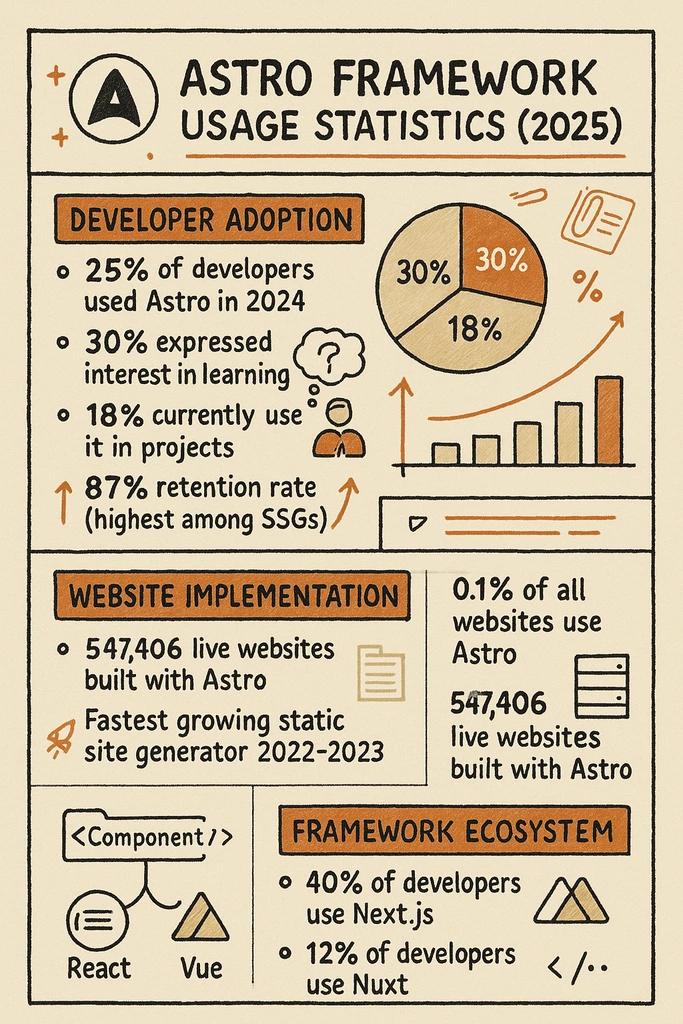
What Astro Is, in One Practitioner Sentence
Astro is a website framework that renders pages on the server (or at build time) and ships almost no JavaScript to the browser unless you ask it to. That is the entire architectural bet. Everything you have heard about Astro - the speed scores, the "islands," the support for React and Vue and Svelte components inside the same project - is downstream of that one decision.
For content-led sites, that bet pays off. Marketing pages, blogs, documentation, property listings, portfolio sites - all of them are mostly text, images, and a few interactive bits. Sending a megabyte of React to render a property card with a phone number on it is the kind of thing that made the modern web feel slow. Astro is the answer that does not require giving up the component model developers prefer.
I run DignuzDesign on Astro deployed to Cloudflare. The same stack runs AmplyDigest, the AI-summarized newsletter and content digest service I built that compresses newsletters, YouTube videos, and other feeds into a single morning email. Both projects are content-led with a few interactive surfaces, which is the territory Astro was built for. The repositories are small, the builds are fast, and Lighthouse scores stay high without me babysitting them. That is the experience you sign up for when you pick Astro for the right job.
The Islands Architecture, Without the Buzzword Theatre
Astro popularized "islands architecture," but the term itself was coined earlier by Etsy's Katie Sylor-Miller and written up in detail by Preact's Jason Miller in his original Islands Architecture post. The idea predates Astro. Astro just shipped the first mainstream framework that made it the default.
The mental model is simple. Your page is HTML, rendered ahead of time. Most of it is static and ships with zero JavaScript. A few areas - a search input, a carousel, a video player - need interactivity. Each of those becomes an "island." Astro hydrates those islands independently, on whatever trigger you specify, while the rest of the page stays static. You can read the full mechanic in the official Astro islands documentation.
The version that matters in practice: a property listing page on a real estate site renders as pure HTML. The hero image loads. The text loads. The CTAs render and are clickable. If a buyer scrolls down to the photo gallery, that one gallery component (which needs JavaScript for lightbox behavior) hydrates. If they scroll further to a mortgage calculator, that one hydrates. The page never had to wait for a JavaScript bundle to become usable. That is the Core Web Vitals story in one paragraph.
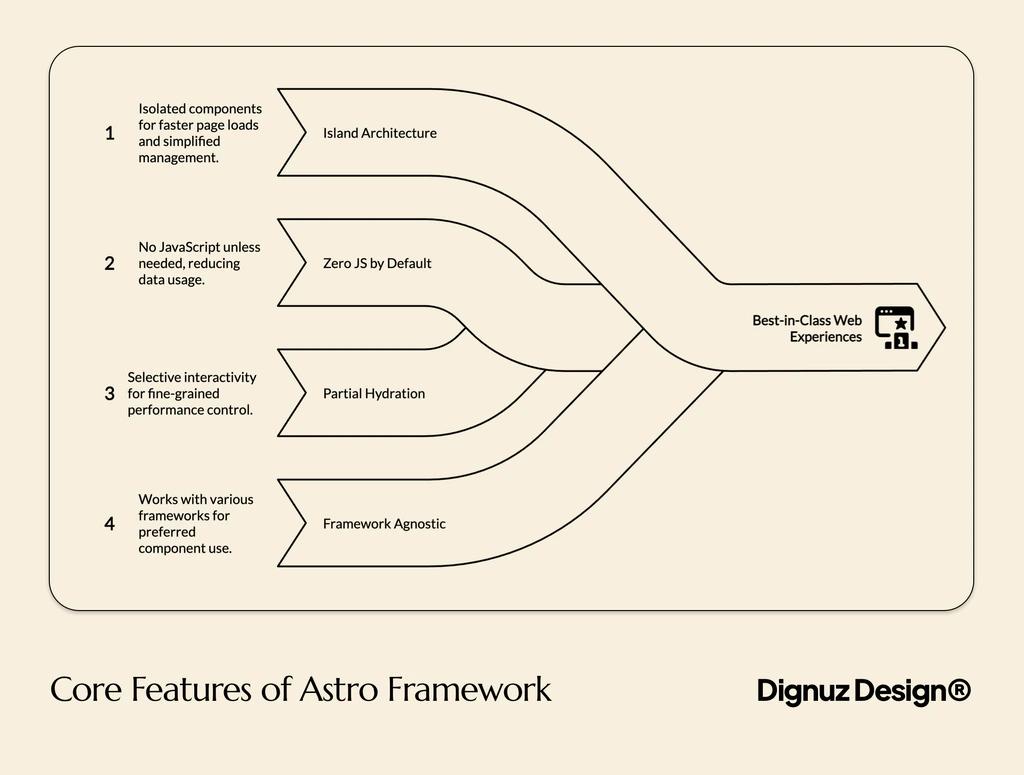
Zero JavaScript by Default - What It Means in the Build Output
The phrase "zero JavaScript by default" is the kind of marketing language that gets repeated without anyone explaining the build output. Here is what actually happens when you run astro build on a content-led site.
You get a dist/ folder full of .html files. You get a CSS file. You get whatever images, fonts, and assets your pages referenced. If you did not use any client:* directives, you do not get a _astro/ JavaScript chunk for hydration. The site genuinely ships as HTML and CSS. If you add a single interactive component with client:visible, Astro creates a small JavaScript chunk for that component and nothing more. You can see this in the build summary - Astro prints the JS payload per page, and on a content site it is often 0 kB.
Compare that to a Next.js build of the same content site. Even on a fully static page, Next.js ships its runtime - React, the router, the page manifest. It is fast and well-optimized, but the floor is "a few tens of kilobytes of JavaScript on every page." Astro's floor is zero. That difference is the whole reason to consider Astro instead of Next.js for content work.
If you have not seen the impact of JavaScript on real device performance, our writeup on real estate website speed optimization walks through how page weight translates into lost conversions on listings. The relationship is not subtle.
The Hydration Directives - Where Astro Asks Something of You
This is the section every beginner tutorial skips, and it is the part that decides whether your Astro project ages well.
When you mark a component with a client:* directive, you are telling Astro three things at once: that this component needs JavaScript, that you accept the bundle cost, and that you have picked a hydration trigger. The four common ones look like this:
---
import PropertyGallery from "../components/PropertyGallery.svelte";
import MortgageCalc from "../components/MortgageCalc.svelte";
import Newsletter from "../components/Newsletter.svelte";
import LiveChat from "../components/LiveChat.svelte";
---

<PropertyGallery client:load images={images} />
<MortgageCalc client:visible />
<Newsletter client:idle />
<LiveChat client:media="(min-width: 1024px)" />
client:load hydrates immediately, in the critical path. Reserve it for things visible above the fold that the user will touch in the first second. client:visible waits until the component scrolls into view, which is perfect for galleries, comparison widgets, and mortgage calculators. client:idle waits until the browser is idle, which is good for newsletter signups and footer widgets. client:media conditionally hydrates based on a media query.
The mistake beginners make is reaching for client:load everywhere because it feels safest. It is not. Every client:load is a JavaScript bundle in your critical path. The discipline of asking "does this need JavaScript at all, and if so when?" is the actual skill of working in Astro. The framework does not enforce good decisions. It just makes good decisions cheap and bad decisions visible in your Lighthouse report.
Astro vs Next.js - The Honest Take
Next.js is excellent at what it does, and what it does is not what Astro does. Next.js is built for applications: dashboards, app surfaces, things with auth and state and personalized data on every render. It can do content well, but you are paying for capabilities you do not use.
I reach for Next.js when the page is mostly interactive logic, when the team is committed to React, or when the project leans on Vercel's deployment story. I reach for Astro when the page is mostly content, when image and text rendering speed matters more than client-side reactivity, and when I want to keep my options open about component frameworks.
There is one more thing worth saying. Astro on Cloudflare is a real production combo, not a science experiment. The Cloudflare Workers Astro guide documents the adapter, and the pairing is straightforward: static output served from Cloudflare's edge for global delivery, optional SSR via Workers for the dynamic bits. That stack is what powers most of the production work coming out of DignuzDesign.
For a deeper look at where Jamstack-style stacks fit for property work specifically, our piece on Jamstack property developer websites covers the architectural reasoning.
Astro vs Webflow - Because That Is What Real Clients Compare
Most beginner Astro articles compare it to Next.js or Gatsby. The comparison real estate and small business clients actually ask me about is Astro vs Webflow. They are not asking which framework wins on developer Twitter. They are asking who will own the editing workflow once the site ships.
Webflow gives you a CMS that the client can drive without touching code. The tradeoffs are pricing per editor, less control over markup, and a ceiling on custom behavior. Astro gives you full control of the markup, fast delivery, and a development experience your developer will enjoy, but somebody needs to handle content updates. Either the developer does it, or you pair Astro with a headless CMS, or you build a small editing UI.
I use both. Webflow ships fast when the client wants to self-serve. Astro ships fast when performance, custom interactivity, or a complex content model matters more than visual editing. Neither framework is "better." They serve different client realities. If you want a longer breakdown of when custom development beats template tools, see why custom real estate websites outperform template solutions.
When Astro Is the Wrong Choice
Astro is not a fit for every project, and pretending otherwise just gets people frustrated. Skip Astro when any of these are true:
- App-shaped products with heavy client state. A SaaS dashboard, a multi-step booking flow with deeply nested forms, a collaborative editor - these are not "content with islands." They are applications. Pick a framework built for applications.
- Real-time multiplayer features. Chat, presence, live cursors. Astro does not stop you, but you are fighting upstream.
- The team only knows one framework and refuses to learn another. Astro's framework-agnostic story sounds great until you realize "use any framework" still means somebody has to maintain that decision. Pick the framework your team can support, then evaluate Astro on top.
- Pages that are 90 percent interactive surface. If the static HTML portion of your page is small and the JavaScript portion dominates, the value of islands evaporates. You are not getting paid for the architecture.
The mistake to avoid is treating Astro as a universal answer. It is a focused tool. Use it where its bet pays off.
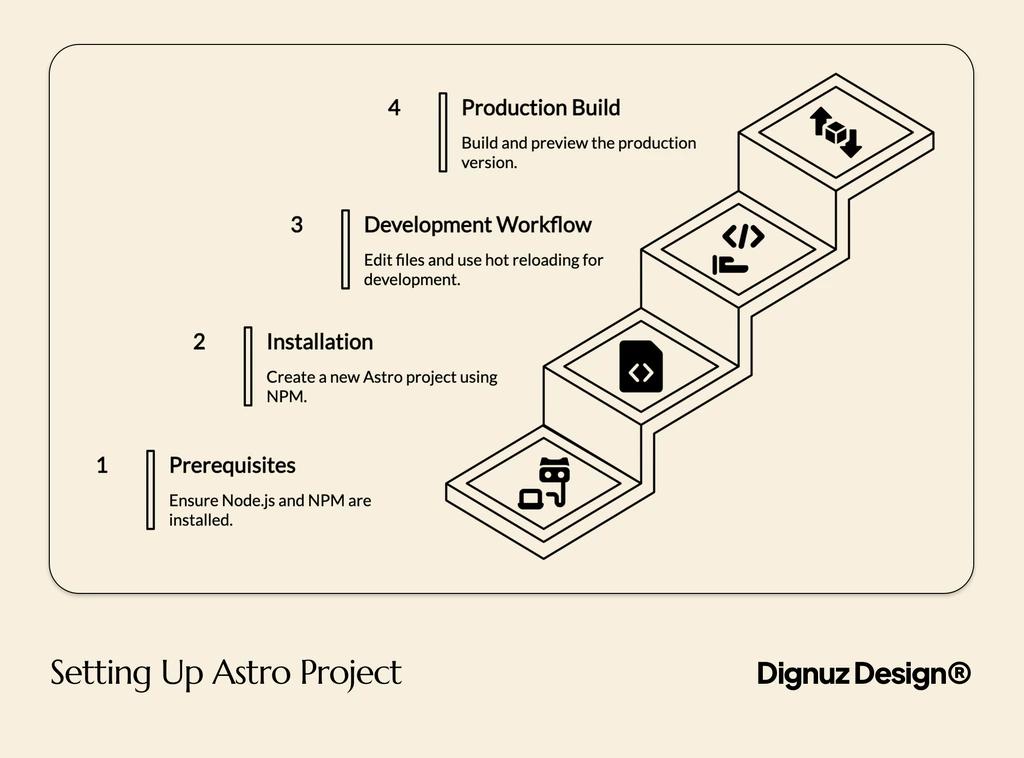
Starting Your First Astro Project
The bootstrap is honestly trivial:
npm create astro@latest
cd your-project
npm run dev
The CLI walks you through template selection, TypeScript setup, and dependency installation. The dev server runs on localhost:4321 by default (not 3000, despite what older guides claim). Hot reload is instant.
The first thing to do once the dev server is up: open src/pages/index.astro and notice how it looks like HTML with a frontmatter block at the top. That frontmatter is JavaScript or TypeScript that runs at build time. The HTML below it can interpolate values from that frontmatter. There is no client-side JavaScript here unless you explicitly add a component with a client:* directive.
That single mental model, "frontmatter runs once at build time, HTML is what ships," is the entire .astro file format. Once it clicks, you will write Astro pages faster than you wrote anything in a previous framework.
If you are coming from a background where HTML and CSS were treated as the bottom of the stack, our piece on whether HTML is still relevant in web development sets useful context. Astro rewards developers who actually like writing HTML.

Frequently Asked Questions
Is Astro good for beginners?
Yes, if the beginner already knows HTML, CSS, and a little JavaScript. Astro does not invent a new language. It builds on the web platform. The .astro file format reads like HTML with a script block at the top, which is easier to learn than learning JSX. The harder concept for beginners is understanding the difference between build-time code (in the frontmatter) and client-time code (in hydrated islands), but that distinction is shorter to learn than React's mental model.
Do I need to know React to use Astro?
No. Astro has its own component format and you can build entire sites without touching React. If you do want to use React components inside Astro, you can, and the same is true for Vue, Svelte, Solid, and Preact. The framework-agnostic design means you bring your existing component knowledge in rather than learning a new one.
Is Astro really faster than Next.js?
For content-led sites, yes, and the reason is structural rather than tuning. Astro ships zero JavaScript by default, while Next.js ships its runtime even on static pages. For application-shaped projects with heavy client logic, the comparison flips and Next.js is optimized for that workload. The honest answer is that "faster" depends on what the page is doing.
Can I host Astro on Cloudflare or do I need Vercel?
You can host Astro almost anywhere static files can be served, plus any platform that supports its SSR adapters. Cloudflare Workers runs Astro very well via the official adapter. Netlify, Vercel, AWS, Deno Deploy, and self-hosted Node also work. There is no platform lock-in.
When should I use Astro instead of Webflow?
When you need real control over the markup, when performance matters more than visual editing, when you want a Git-based workflow, or when the content model is complex enough to outgrow Webflow's CMS. When the client wants to self-edit a relatively simple site and a developer is not going to be involved long-term, Webflow is usually the more honest answer.
What does Astro do for SEO?
Astro produces clean, semantic HTML that renders fully before any JavaScript loads. Search engines and AI crawlers see content immediately rather than waiting for client-side rendering. Core Web Vitals scores tend to be high because there is so little JavaScript competing for the main thread. None of that is a guarantee of ranking, but it removes a category of technical SEO problems by default.
The Final Take
Astro is not the right answer for every project, but for content-led work it is the cleanest tool I have shipped with in years. The architecture is honest about what it optimizes for. The developer experience respects your time. The build output is small, the deployment story is open, and the framework gets out of the way once you understand its one big idea.
If you build websites where content speed matters - real estate listings, marketing pages, blogs, documentation portals, agency portfolios - Astro deserves a serious afternoon of your attention. Open the docs, run npm create astro@latest, and build something small. The framework either clicks for you in that first session or it does not, and either way you will know more than you did from reading another summary.



