TypeScript vs JavaScript: A Practitioner's Honest Take
The standard advice on this question goes something like: JavaScript is great for small projects and quick prototypes, TypeScript is for large applications and big teams. I have seen that line repeated in roughly every comparison article on the internet, and after a few years of running TypeScript across my own production stack, I think it is mostly wrong. Or rather, it is right about big teams and wrong about everyone else.
I am Dimitri, the developer behind DignuzDesign, where I build custom websites for real estate companies, architects, and property developers. The same hands that write client work also ship AmplyDigest, a small product that summarizes newsletters and YouTube videos into a single morning email. Both run on TypeScript end to end. Neither has a "team" in the corporate sense. And in both cases the types have earned their keep many times over, in ways that have nothing to do with team coordination.
This article is the comparison I wish I had read when I was first deciding. Same topic as the usual TypeScript vs JavaScript posts. Different conclusion in several spots.
The one-line answer, and the asterisk
If you are starting a new web project in the second half of the 2020s and you do not have a strong reason to choose otherwise, write it in TypeScript. The tooling is good, the cost is real but small, and the compiler will save you from your future self more times than you can count.
The asterisk: there are still a handful of cases where plain JavaScript is the right call. I will get to those near the end. But "small project" and "solo developer" are not on that list. Those are the cases where TypeScript helps the most, not the least.
What JavaScript actually is
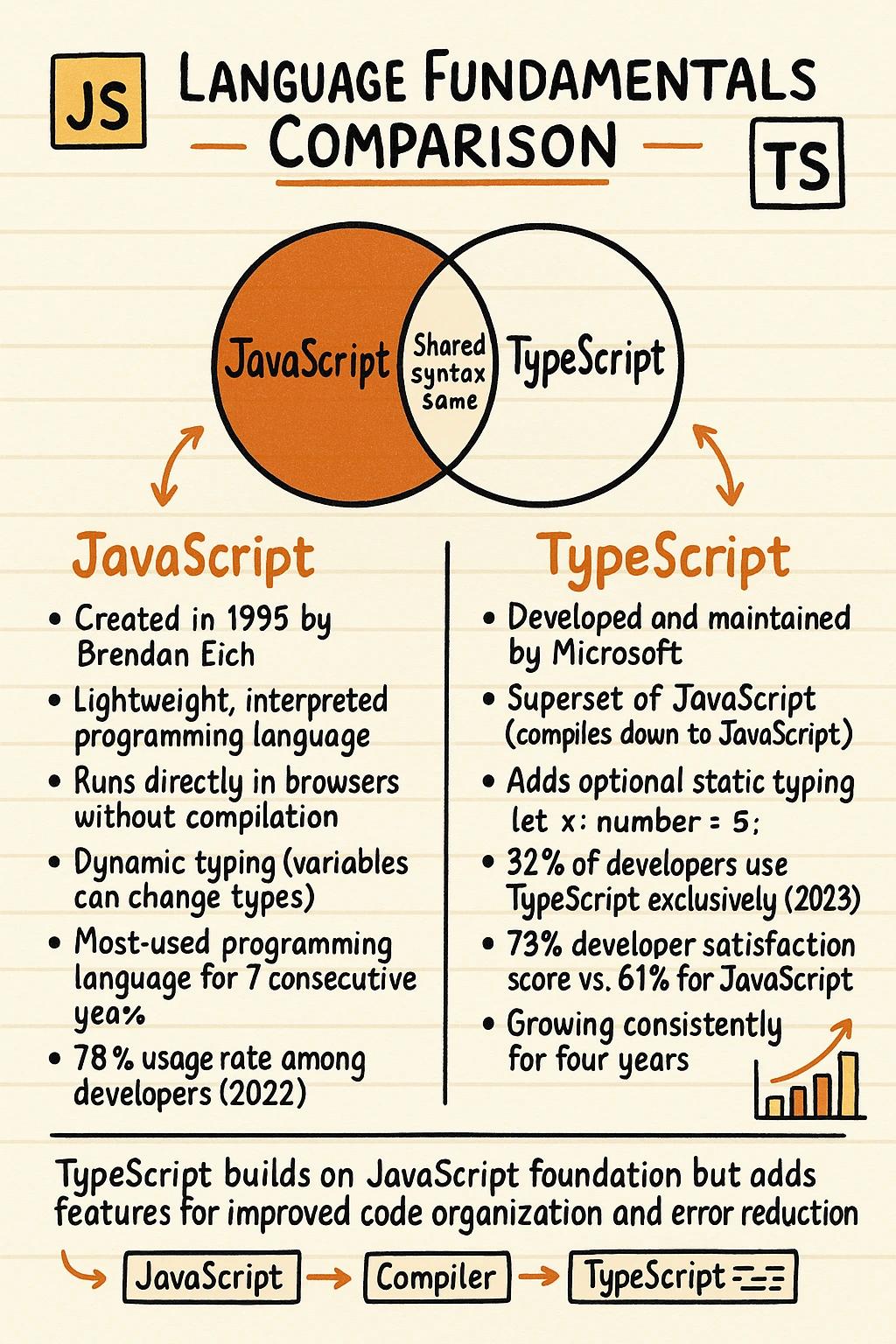
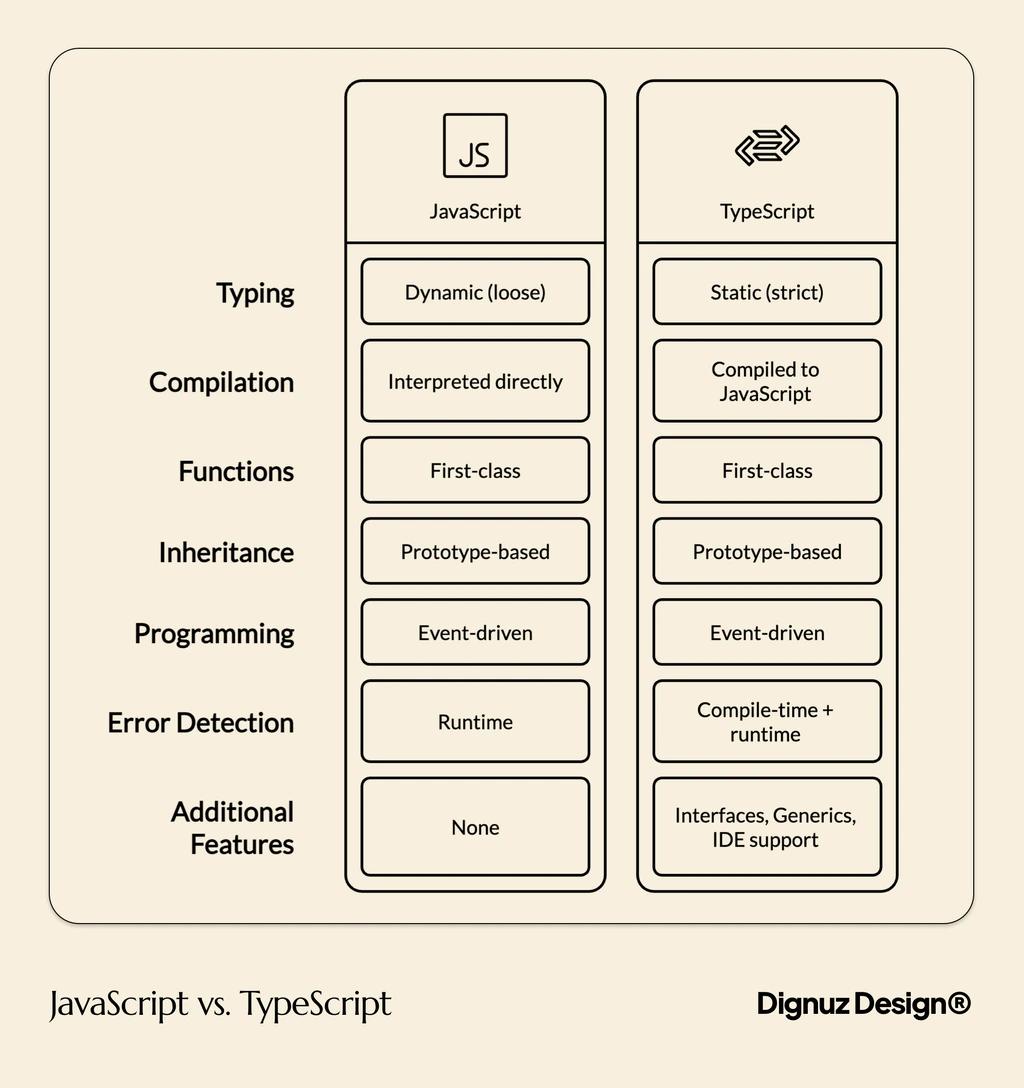
JavaScript is the language the browser runs. It is dynamically typed, which means a variable can hold any kind of value at any time, and the engine only complains when something blows up at runtime. Brendan Eich wrote the first version in ten days in 1995, and a lot of the design decisions from that fortnight are still with us today. Some of them are charming. Some of them have caused entire industries of bug fixes.
What JavaScript is good at is being everywhere. Every browser runs it without compilation. Node.js, Deno, Bun, and Cloudflare Workers run it on the server. There is no setup tax, which is genuinely valuable when you are sketching something out in a single file or writing a quick automation script. If you want a deeper look at how the language actually executes, I have a separate piece on how JavaScript works under the hood.
The flip side of dynamic typing is that the language gives you very little help when your code grows past the point you can hold in your head. Renaming a function, changing a function signature, removing a field from an object that gets passed around in five places - JavaScript will let you do all of these and then surprise you in production.
What TypeScript actually adds
TypeScript is JavaScript with a type checker bolted on. You write code that mostly looks like JavaScript, you add type annotations where useful, and a compiler verifies that your code is internally consistent before it ever runs. The compiler then strips the types out and produces plain JavaScript that the browser or runtime executes.
That is the technical description. The practical description is that TypeScript turns your editor into a fact-checker. When you type user., the editor lists the actual fields on a user object. When you change a function to take three arguments instead of two, every call site lights up red until you fix it. When you misspell a property name, you find out before you save the file.
The official TypeScript handbook calls this gradual typing - you can adopt as much or as little of the type system as you want, and the rest stays as flexible JavaScript. In practice the gradual part matters less than people think. Once you start, you tend to want types everywhere, because the value compounds.
The case nobody makes loudly enough: TypeScript is best for small teams and solo developers
The conventional framing - "TypeScript for large teams, JavaScript for solo work" - assumes the main value of types is helping teammates understand each other's code. That is a real benefit. But it is not the biggest one.
The biggest benefit of types is that the compiler remembers what your code does when you do not. I am the only person who works on AmplyDigest. There is no team. There is no corporate codebase. And every few months, I open a file I wrote half a year ago to add a feature, and I have completely forgotten how the data flows through it. The types are the only thing standing between me and a confused two-hour archaeology session.
When I rename a field in the database schema, the compiler walks me through every spot in the code that needs to change. When I refactor a Hono route to return a slightly different shape, the frontend that consumes that route lights up immediately. None of this requires a team. It just requires that I stop trusting my memory.
This is also where the "JavaScript for small projects" framing falls down. Small projects grow. The "small" prototype I built three years ago is now the thing customers pay for. If I had written it in untyped JavaScript, I would either have rewritten it by now or stopped touching it. Neither outcome is great.
For a deeper look at where TypeScript actually runs (browser, server, both), the piece on whether TypeScript is frontend or backend covers the practical answer.
The real cost of TypeScript, including the parts most articles skip
TypeScript is not free. The honest cost breakdown:
- A compile step. You need a build tool. In practice this is invisible because every modern framework already has one. Astro, Vite, Next.js, SvelteKit, Hono - they all handle TypeScript out of the box.
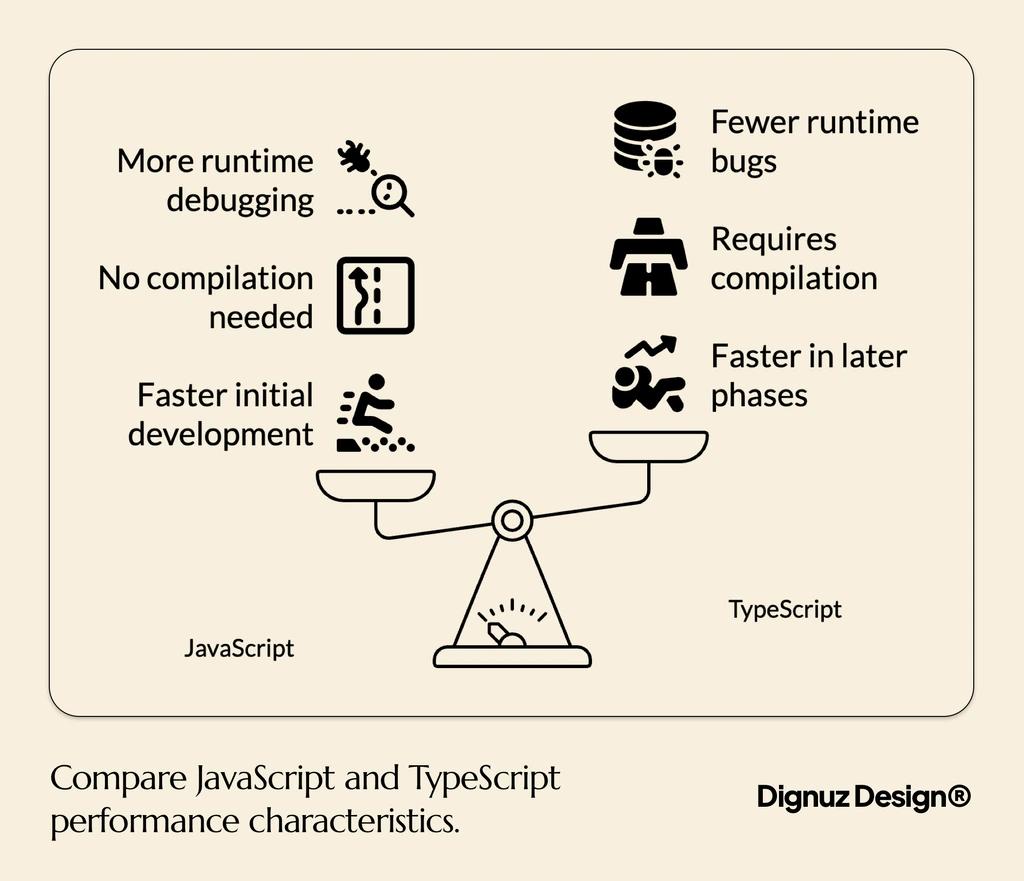
- Slower initial development on the first day. You will spend a few extra minutes typing things out instead of just writing the logic. This goes away within a week.
- Friction with libraries that ship bad type definitions. This is real, occasional, and annoying. The fix is usually a one-line type assertion and moving on.
- The temptation to overengineer your types. TypeScript has a remarkably powerful type system, and it is possible to spend an afternoon building a generic type that nobody including you will understand next month. Resist.
The cost most articles skip: TypeScript can give you false confidence. The compiler verifies that your code is internally consistent, not that it is correct. A 2017 Microsoft Research study, "To Type or Not to Type", found that adding type annotations to JavaScript codebases caught about 15 percent of public bugs that had been fixed in those projects. That is a significant slice, but it is not most of them. Logic errors, race conditions, wrong API responses, broken assumptions about user input - none of those go away because you wrote : string next to a variable.
When I still reach for plain JavaScript
There are three situations where I do not bother with TypeScript:
First, throwaway scripts. A one-off shell script that scrapes a page, transforms a CSV, or pokes at an API once. If the code is going to live for fifteen minutes, the type setup is more friction than help. I write it as a single .mjs file and move on.
Second, very small inline scripts inside HTML. The bit of JavaScript that toggles a mobile menu on a marketing page does not need a build pipeline. Twenty lines of vanilla JavaScript, written directly into the page, ship faster and behave more predictably than the same logic routed through a framework.
Third, code I am writing as a learning exercise to understand a new browser API. When I am poking at the Intersection Observer API for the first time, types between me and the API surface make exploration slower. I write rough JavaScript, then port to TypeScript once I understand what I am building.
Notice what is not on this list: client work, products, anything that goes to production, anything I want to come back to in three months. All of those are TypeScript by default.
Where TypeScript pays off most across a real stack
The argument for TypeScript gets stronger when types flow across system boundaries. A small concrete example from my own work.
The Astro sites I build for real estate clients fetch property data from a small API. That API runs on Cloudflare Workers using Hono, which is a tiny TypeScript-native framework. Hono lets you derive the types of your API responses from your route definitions, and then import those types into your frontend. The result is that when I add a new field to a property listing response on the server, the Astro page that renders it knows about that field immediately. If I forget to handle it, the build fails.
This kind of end-to-end type safety is not theoretical. It is the difference between catching a broken response shape during astro build and catching it on a customer's screen. Once you have lived with it, going back to "the API returns whatever and the frontend hopes for the best" feels reckless.
The same logic applies to JavaScript backend frameworks in general. Express, Fastify, Hono, NestJS, all of them have first-class TypeScript support, and the type information is most useful when it crosses the network boundary into your frontend code.
If you are choosing the frontend framework first, Astro is a strong default for content-heavy sites and supports TypeScript out of the box. Svelte and SvelteKit are similar. React with Vite is similar. There is no modern frontend stack where TypeScript feels like an afterthought.
A migration plan that survives contact with your codebase
If you have an existing JavaScript codebase and want to move it to TypeScript without breaking everything, the gradual approach actually works. The order I have used on my own projects:
Start by adding a tsconfig.json with allowJs: true and checkJs: false. This lets TypeScript coexist with your existing JavaScript files without complaining. The build still produces the same output as before. Nothing visible changes for your users.
Next, rename one file from .js to .ts. Pick something small and self-contained. Fix the type errors that appear, which will mostly be missing annotations on function parameters. Resist the urge to convert everything in one sitting. The point is to prove the workflow.
Once a few files are converted, turn on strict: true for new files only. The strict mode is where TypeScript stops letting you cheat with implicit any types. It is also where most of the value is.
Continue file by file, in order of how often the file changes. Files you touch every week benefit most from being typed. Files that have not been edited in two years can stay as JavaScript indefinitely. There is no prize for hundred percent conversion.
The trap to avoid is doing a "big bang" migration where you convert everything at once. I have seen this fail more often than it works. The codebase ends up in a half-broken state for weeks, the team gets frustrated, and the project either reverts or stalls. Gradual migration is slower in calendar time and faster in practice.
How to actually decide for your next project
Strip away the frameworks of comparison and the question becomes simple. Two checks:
First check: will this code exist in three months? If yes, write it in TypeScript. The cost of types is paid up front. The benefit accrues every time you come back to the code, every time you refactor, every time someone else reads it. Anything with a future deserves the safety net.
Second check: do you want a build step? If you genuinely cannot have a build step - you are dropping a script directly into a CMS, you are writing a snippet that needs to run as-is - then JavaScript is the answer. Otherwise the build step is already there because every modern framework has one, and TypeScript adds nothing to your deployment complexity.
Notice what is not on this list. Project size is not on the list. Team size is not on the list. Whether you are doing real estate websites, a SaaS product, a 3D viewer like AmplyViewer, or a simple landing page, the same two checks apply. The size and team framing in most comparison articles is a holdover from the years when TypeScript tooling was rough and the cost of adoption was high. That has not been true for a long time.

Frequently asked questions
Is TypeScript faster than JavaScript?
No. TypeScript compiles to JavaScript and then runs on the same engines, so runtime performance is identical to equivalent JavaScript. The build is slightly slower because of the type-checking step, but the output is the same. If anything, TypeScript code tends to perform marginally better in practice because the compiler nudges you toward consistent shapes that JavaScript engines can optimize more aggressively.
Do I need to learn JavaScript before TypeScript?
Yes. TypeScript is a layer on top of JavaScript, and every concept in JavaScript - asynchronous code, closures, prototypes, the event loop - still applies. There is no shortcut around learning the underlying language. The good news is you do not need to master JavaScript before adding types. A working knowledge is enough to start, and TypeScript will actually teach you JavaScript more deeply by surfacing the assumptions you would otherwise miss.
Can I use TypeScript with React, Vue, Svelte, or Astro?
Yes, all of them. TypeScript has first-class support in every major modern frontend framework. React has dedicated type definitions for components and hooks. Vue 3 was rewritten in TypeScript and ships excellent types. Svelte has TypeScript support in both single-file components and external files. Astro uses TypeScript by default and gives you full IDE support out of the box.
Will TypeScript catch all my bugs?
No, and anyone who tells you otherwise is selling something. Research from Microsoft suggests TypeScript catches around 15 percent of historical bugs in JavaScript codebases. That is significant - one in seven bugs prevented from ever shipping is a real improvement - but it leaves the majority of bugs untouched. Types catch shape and signature mistakes. They do not catch wrong logic, race conditions, bad SQL, or assumptions about external data.
How long does it take to learn TypeScript if I already know JavaScript?
The basics take a weekend. You learn type annotations, interfaces, generics, and you can be productive on a real codebase by Monday. Mastering the more advanced parts of the type system - conditional types, mapped types, template literal types - takes longer, and most projects do not need them. I would not stress about the advanced features. Use them when you find a problem they actually solve.
Should I migrate an existing production JavaScript app to TypeScript?
It depends on how often the code changes. Code you actively maintain benefits from migration. Code that has been stable for years probably does not - the migration cost outweighs the benefit. The right approach is gradual: enable allowJs, convert files as you touch them for other reasons, and accept that some files will stay as JavaScript indefinitely. There is no badge for hundred percent coverage.
Final thoughts
The TypeScript versus JavaScript decision is less interesting than the comparison articles make it out to be. TypeScript has won by default for new production work. The remaining question is whether your specific case is one of the few where plain JavaScript still makes sense, and most of the time the honest answer is no.
If you are evaluating which language to use for a website, a product, or a client project, what matters more than the language choice is the surrounding decisions: your hosting, your data layer, your framework, your build pipeline. The language is the easy part. The harder questions are the ones I work through every week with clients at DignuzDesign when we plan a new build.
For TypeScript specifically, my recommendation is to default to it, keep your types simple, and stop reading articles that frame the choice as "small projects use JavaScript." Small projects grow into the projects you wish you had typed.



