Is WordPress a Headless CMS?
Here's a question that pops up in our client conversations all the time: "Can WordPress work as a headless CMS?" The short answer? Absolutely! But there's so much more to unpack here, and honestly, it's one of those topics that gets way more complicated than it needs to be.
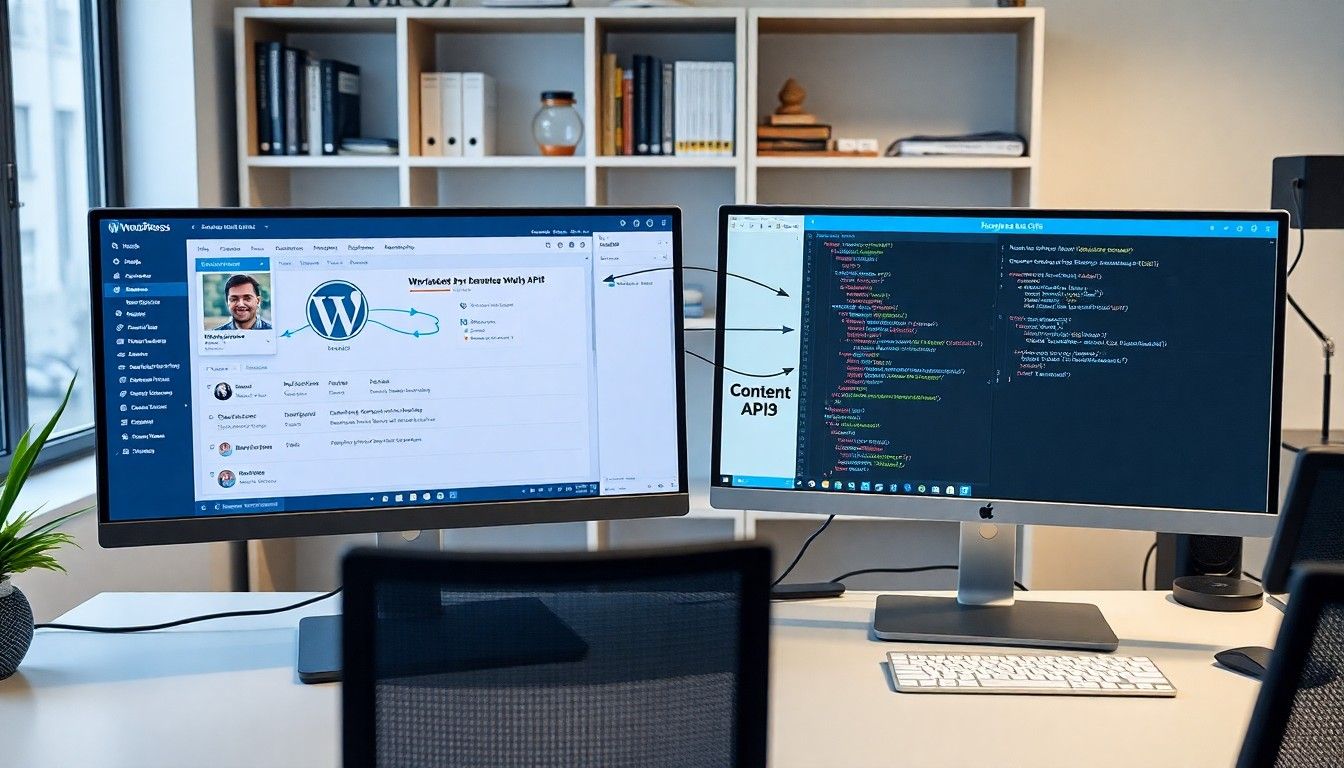
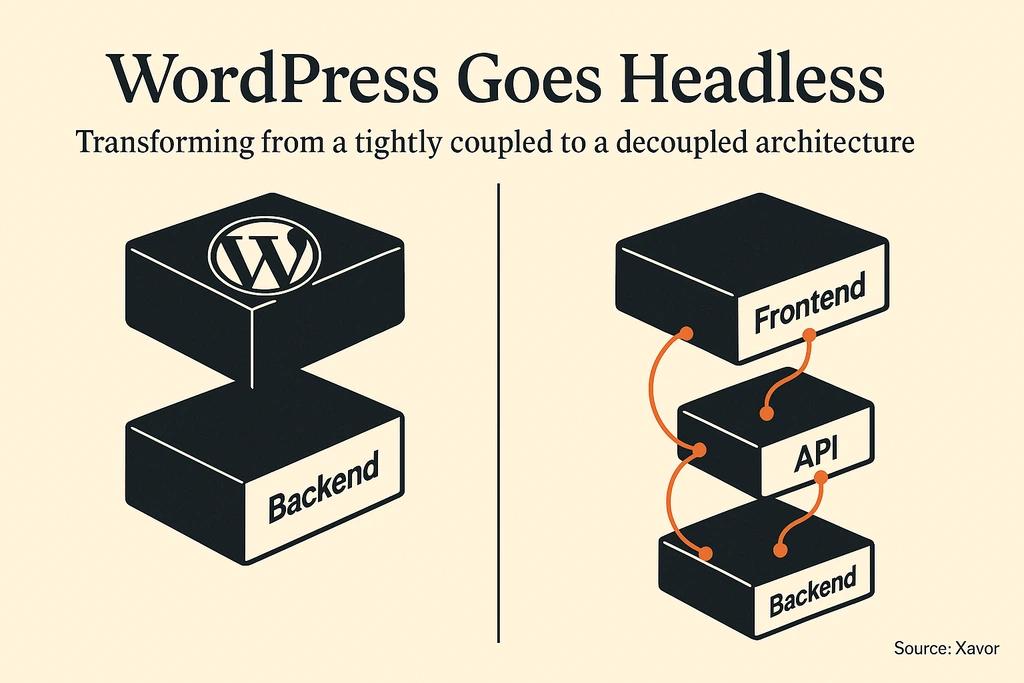
Look, we've been in the web development space long enough to see trends come and go. While we're huge fans of Webflow for modern web projects, we get it - sometimes you're already invested in WordPress, or your team is comfortable with it. The good news is that WordPress can absolutely function as a headless CMS when you decouple its traditional front-end, allowing content to be managed in WordPress and delivered via APIs to any front-end technology (Source: Xavor).
WordPress can be decoupled to act as a headless CMS, delivering content via APIs.
What you'll discover in this guide: how WordPress transforms from a traditional CMS into a powerful content API, why this setup might make sense for your project, and the practical steps to make it happen. Plus, we'll share some honest insights about when this approach works brilliantly and when you might want to consider alternatives.
What Exactly Is a Headless CMS?
Think of a traditional CMS like WordPress as a house where the kitchen (content management) and living room (what visitors see) are connected by an open floor plan. A headless CMS is like separating these rooms entirely - you still have your kitchen for preparing content, but now you can serve that content to multiple living rooms, mobile apps, or even smart displays.
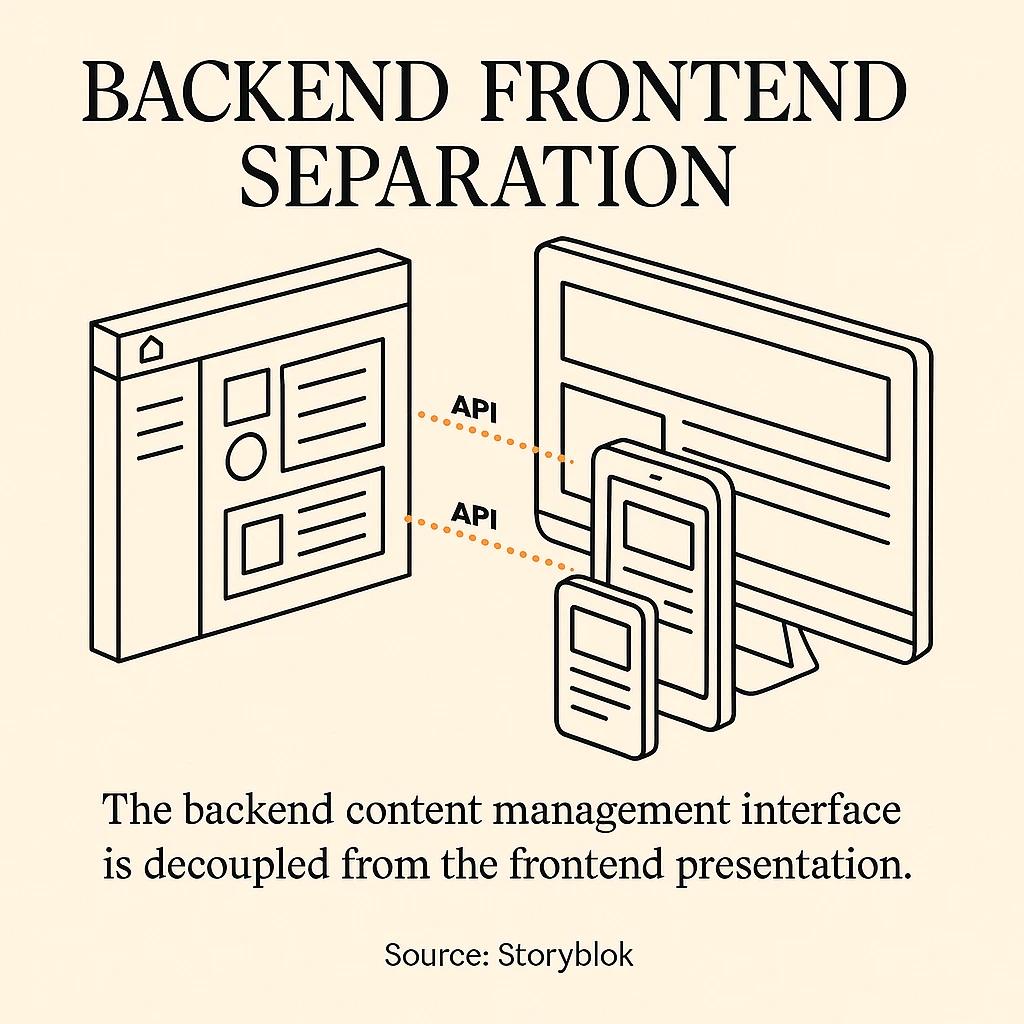
In technical terms, a headless CMS is a content management system where the backend (content repository and management interface) is separated from the frontend (presentation layer) (Source: Storyblok). The term "headless" refers to the absence of a built-in frontend, giving developers the freedom to build custom user interfaces independently of the CMS backend.
Headless CMS separates the backend (content) from the frontend (presentation), connected via APIs.
When WordPress goes headless, content creators still use that familiar WordPress admin dashboard they know and love. But instead of WordPress generating the website pages directly, it serves up content as structured data through APIs. This is where things get interesting for developers who want to build faster, more flexible websites.
- Traditional WordPress: Tightly coupled frontend/backend
- Headless WordPress: Completely separated layers
- Key Difference: Architecture flexibility
- Traditional WordPress: PHP-based themes
- Headless WordPress: Any frontend technology
- Key Difference: Developer freedom
- Traditional WordPress: Single website output
- Headless WordPress: Multiple platform delivery
- Key Difference: Content distribution
- Traditional WordPress: WordPress hosting requirements
- Headless WordPress: Separate frontend hosting
- Key Difference: Performance optimization
How Headless WordPress Actually Works
Here's where it gets fun - and where our development team has seen some really cool implementations. WordPress exposes content through APIs (typically REST, and optionally GraphQL via plugins), enabling developers to fetch and display content on any platform using any programming language or framework (Source: Codeable).
WordPress REST/GraphQL APIs let you distribute content to web, mobile, and more.
The process works like this: your content team manages everything through the WordPress admin interface, just like always. When they hit publish, that content becomes available as structured JSON data via the WordPress REST API. If you want to get fancy with GraphQL (which requires the WPGraphQL plugin), that's an option too (Source: WP Beginner).
On the frontend side, this is where developers can really flex their creativity. Whether you're building with React, Next.js, Vue, or even static site generators, your frontend application fetches content from the WordPress API and renders it however you want. We've seen clients build everything from lightning-fast static sites to interactive web applications this way.
Want to see this in action? Set up a simple test by creating a WordPress post, then visit yoursite.com/wp-json/wp/v2/posts in your browser. You'll see your content formatted as JSON data - that's your WordPress API in action.
- Install WordPress and create some sample content
- Access the REST API endpoint at /wp-json/wp/v2/posts
- Build a simple frontend that fetches this data
- Style and display the content using your preferred framework
The Real Benefits (And Why You Might Care)
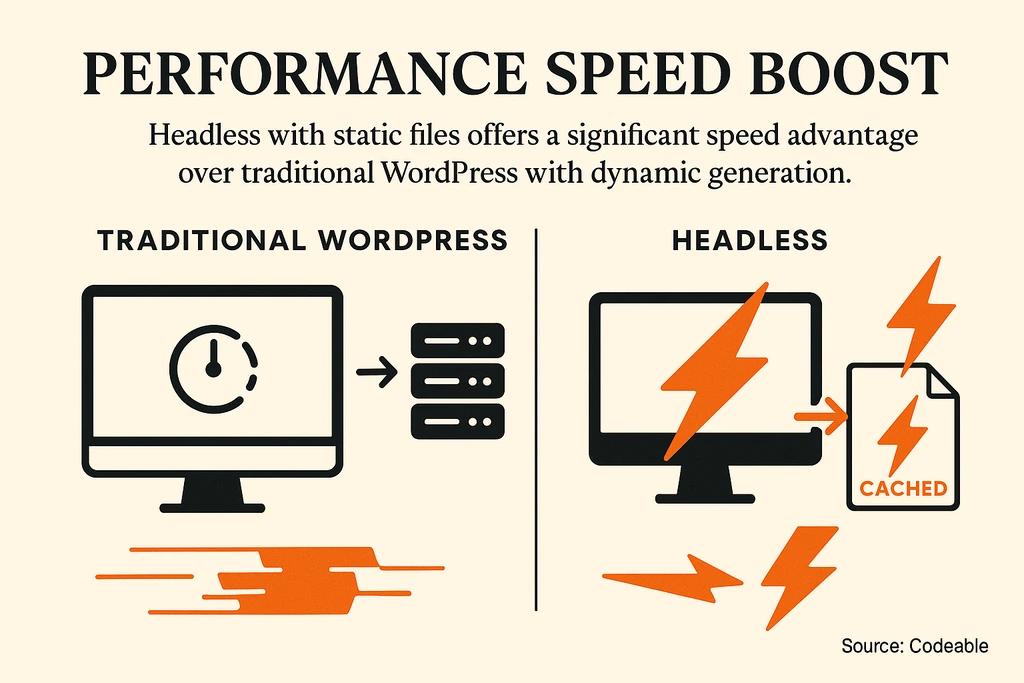
Alright, let's talk about why anyone would want to go through the extra complexity of splitting WordPress in half. The performance gains alone can be significant - headless sites are often pre-built into static files, resulting in faster load times compared to traditional WordPress sites that generate pages dynamically for each visitor (Source: Codeable).
Headless architectures can prebuild pages as static assets, improving load speed.
But performance is just the beginning. The developer flexibility aspect is where things get really exciting. Your development team isn't limited by WordPress themes or PHP constraints anymore. Want to use the latest JavaScript frameworks? Go for it. Need to integrate with specific APIs or services? Much easier when you control the entire frontend stack.
Security gets a nice boost too. The separation of backend and frontend reduces the attack surface, as the backend is not directly exposed to the public. Your WordPress admin lives safely behind the scenes while your frontend can be hosted on a CDN for blazing-fast global delivery.
Page Load Speed
- Traditional WordPress: Dynamic generation each visit
- Headless WordPress: Pre-built static files
Developer Tools
- Traditional WordPress: Limited to PHP/WordPress ecosystem
- Headless WordPress: Any modern framework or technology
Content Distribution
- Traditional WordPress: Single website
- Headless WordPress: Web, mobile, IoT, multiple platforms
Security Exposure
- Traditional WordPress: Full WordPress stack public
- Headless WordPress: Backend hidden, frontend isolated
Scaling Options
- Traditional WordPress: Coupled frontend/backend scaling
- Headless WordPress: Independent scaling strategies
For our real estate clients especially, this omnichannel content delivery capability is huge. Content managed in WordPress can be distributed to multiple platforms from a single source of truth (Source: Storyblok). Imagine managing property listings once and having them automatically appear on your website, mobile app, and even digital displays in your office.
When Headless WordPress Makes Sense (And When It Doesn't)
Let's be honest about something - headless WordPress isn't always the right choice. Using WordPress as a headless CMS introduces complexity, as developers must build and maintain a separate frontend application. If you're working with a tight budget or timeline, the traditional WordPress approach might be more practical.
Some WordPress plugins and features that rely on the traditional frontend may not work out-of-the-box in a headless setup. That contact form plugin you love? It might need some custom work to function properly. WordPress's preview functionality? You'll need to build that into your custom frontend.
Here's when headless WordPress shines: you have development resources to build and maintain a custom frontend, you need content to appear on multiple platforms, performance is a top priority, or you want to use modern frontend frameworks. For projects where choosing the right backend approach matters, headless WordPress can be a solid content management foundation.
- Development team comfortable with modern JavaScript frameworks
- Need for multi-platform content distribution
- Performance requirements that traditional WordPress can't meet
- Budget for custom frontend development and ongoing maintenance
- Content creators who are already happy with WordPress admin interface
When it doesn't make sense: small business websites with limited budgets, projects that rely heavily on WordPress plugins, teams without frontend development expertise, or situations where WordPress's built-in theming system meets all your needs perfectly well.
Alternatives Worth Considering
While WordPress can work as a headless CMS, it wasn't designed for that purpose from the ground up. If you're starting fresh and specifically want a headless architecture, you might want to consider platforms built specifically for headless delivery.
We're obviously big fans of Webflow's approach to modern web development, which offers many of the benefits you're looking for without the complexity of managing separate frontend and backend systems. Webflow's visual development environment combined with powerful CMS capabilities often delivers the performance and flexibility benefits our clients are seeking, especially for real estate projects where visual presentation is crucial.
Other headless-first options include Contentful, Strapi, or Sanity - each designed specifically for API-first content delivery. These platforms often provide better developer experiences for headless implementations than retrofitting WordPress.
Headless WordPress
- Best For: Existing WordPress teams
- Learning Curve: Medium (frontend development)
- Cost Consideration: Custom development costs
Webflow
- Best For: Design-focused projects
- Learning Curve: Low (visual interface)
- Cost Consideration: Predictable monthly pricing
Contentful
- Best For: Enterprise multi-platform
- Learning Curve: Medium (API-first learning)
- Cost Consideration: Scales with usage
Strapi
- Best For: Custom backend needs
- Learning Curve: High (full development)
- Cost Consideration: Open source base
The key is matching your platform choice to your team's expertise and project requirements. Sometimes the best solution isn't the most technically impressive one - it's the one your team can execute well and maintain long-term.

Getting Started: Your First Steps
If you've decided that headless WordPress makes sense for your project, here's how to approach it practically. Start with a proof of concept before committing to a full build. Set up a local WordPress installation, create some sample content, and build a simple frontend that consumes the WordPress REST API.
Begin with a proof of concept before a full headless WordPress build.
Your technical setup needs attention to both the WordPress backend and your chosen frontend framework. On the WordPress side, ensure your hosting environment can handle API requests efficiently. You'll want to configure proper caching and consider security implications of exposing your content via API endpoints.
For the frontend, solid JavaScript fundamentals are essential since most modern headless implementations rely on JavaScript frameworks. Whether you choose React, Vue, or another framework, make sure your team has the skills to build and maintain the custom frontend.
- Set up a WordPress installation with sample content
- Test the REST API endpoints (/wp-json/wp/v2/posts, /wp-json/wp/v2/pages)
- Choose and set up your frontend framework (React, Next.js, Vue, etc.)
- Build a simple page that fetches and displays WordPress content
- Implement proper styling with your preferred CSS framework
- Test content updates flow from WordPress admin to frontend display
- Plan for deployment and hosting of both backend and frontend
Don't forget about content creator experience. Your editing team needs to understand how their WordPress actions translate to frontend display, especially if you've built custom content types or fields. Documentation and training are crucial for successful headless implementations.
So, is WordPress a headless CMS? The answer is a definite yes - with some important caveats. WordPress can absolutely function in a headless architecture, serving content via APIs while you build custom frontends with modern tools and frameworks. The performance, flexibility, and multi-platform benefits can be significant for the right projects.
But here's the thing - headless WordPress isn't a magic solution that automatically makes every project better. It requires development expertise, ongoing maintenance, and careful consideration of your content team's needs. For many projects, especially in the real estate space where visual presentation and user experience are paramount, solutions like Webflow often deliver similar benefits with less complexity.
The key is honest assessment: do you have the development resources to build and maintain a custom frontend? Will the benefits of headless architecture solve real problems in your project? If the answer is yes, headless WordPress can be a powerful foundation for modern web experiences.
Ready to explore what's possible for your project? Whether you're considering headless WordPress, Webflow, or another modern web solution, we'd love to help you find the approach that fits your goals, timeline, and budget. Sometimes the best technology decision is the one that gets you to market faster with a solution your team can actually maintain long-term.



